An SEO lead at a SaaS company in Bengaluru has a Monday problem: a 40,000 row Search Console export, a crawl of 12,000 URLs, three content briefs due and a client report by Wednesday. With Claude set up properly, the export is grouped into page level winners and losers in minutes, the crawl is checked for redirect chains and missing canonicals with a short script, and the briefs start from the client’s own guidelines rather than a blank page. Without the setup, the same tool produces generic advice and invented numbers.
The short answer: Claude is useful for SEO when you give it your real data and a clear process, and risky when you ask it for facts it cannot know. Use it for analysing exports from Search Console and crawlers, clustering keywords you have already researched, drafting briefs and outlines, writing schema and scripts, technical work through Claude Code, and turning repeat processes into reusable Projects and Skills. Do not rely on it for search volumes, rankings or statistics without a source, and fact check everything before publishing, as Google’s own guidance on AI content requires.
What is Claude, and which parts of it matter for SEO?
Claude is Anthropic’s AI assistant, and for SEO the parts that matter are the chat app with web search, Projects for shared context, Skills for repeatable processes, connectors to your tools, and Claude Code for technical and data work.
| Claude feature | What it is | SEO use |
|---|---|---|
| Chat with web search | Claude can search the web and cite sources in its answers (Claude Help Center) | SERP research, checking documentation, competitor page review |
| Projects | Workspaces where uploaded knowledge and instructions apply to every chat in the project (Claude Help Center) | Brand voice, style rules, client context, past audits |
| Skills | Folders of instructions, scripts and resources Claude loads when relevant, available across Claude.ai, Claude Code and the developer platform (Anthropic) | Repeatable briefs, audits, report templates |
| Connectors | Integrations built on the Model Context Protocol (MCP) that let Claude use external tools and data (Claude documentation) | Reading Google Drive files, working with tools that offer MCP servers |
| Claude Code | An agentic coding tool that reads files, edits them, runs commands and can run scheduled tasks (Claude Code documentation) | Crawl and log analysis, bulk fixes, scripts, programmatic templates |
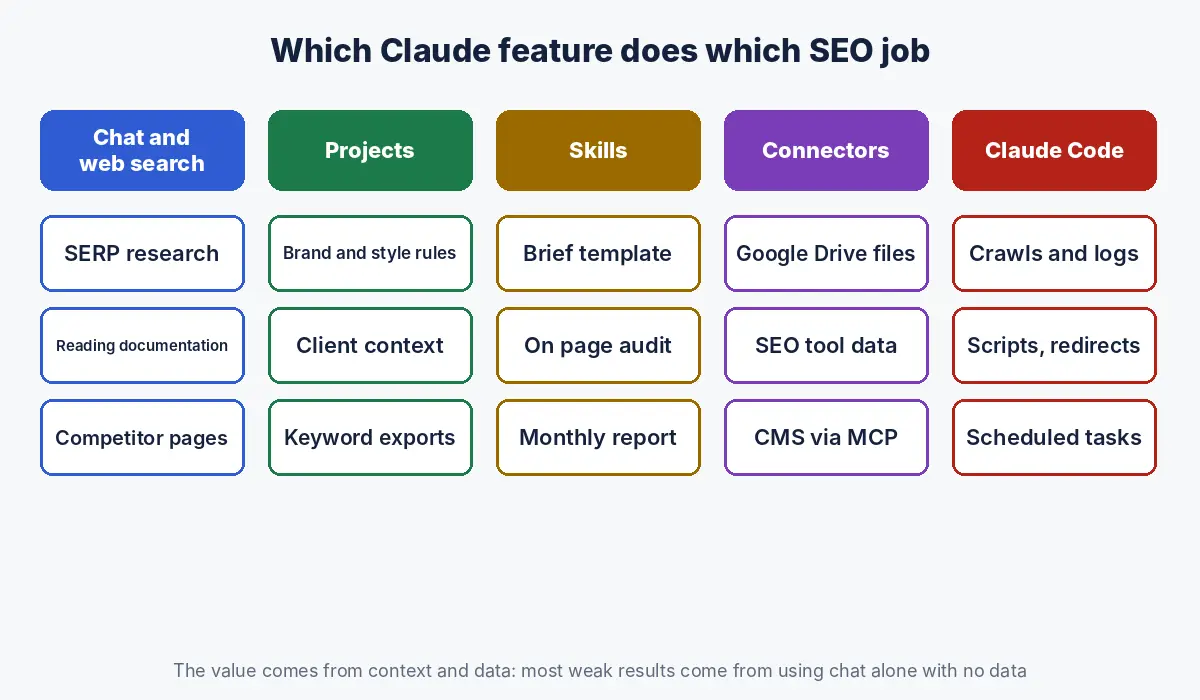
Most people who say “Claude was useless for SEO” used only the first row, with no data and no context. The value comes from the other four.
Which SEO tasks is Claude good at, and which should you avoid?
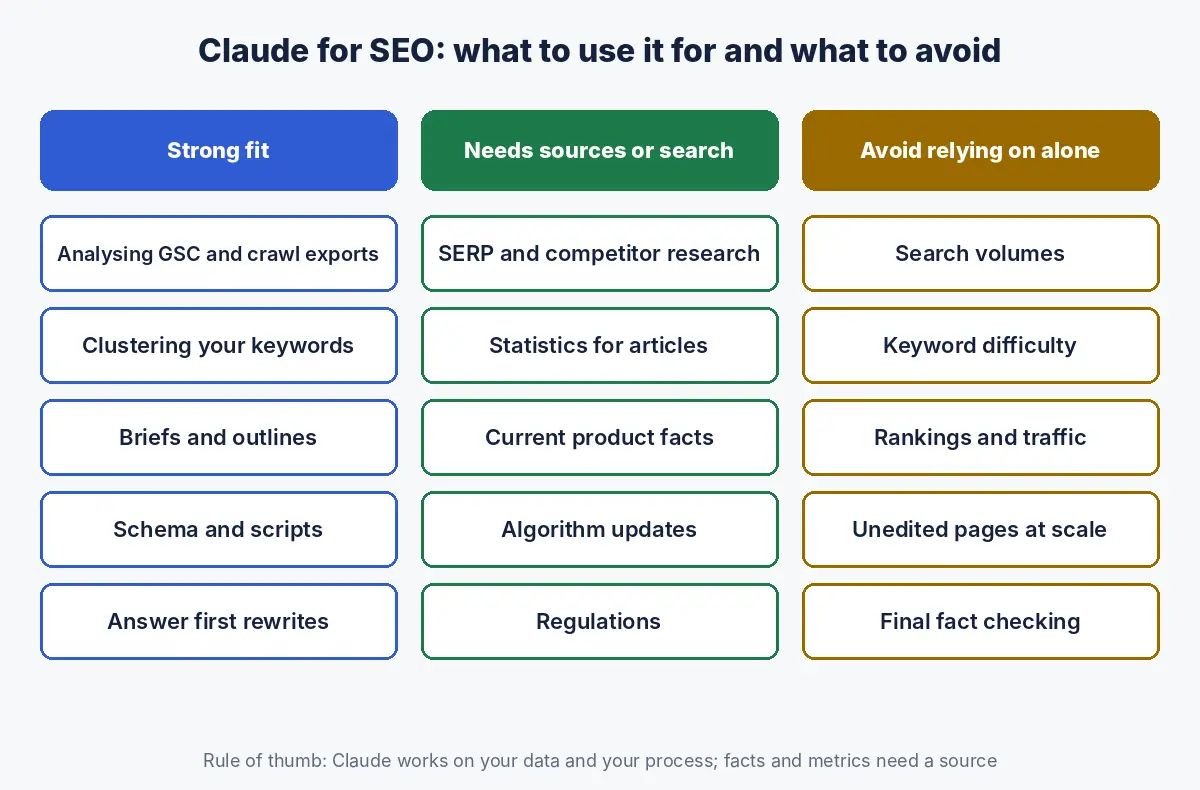
Claude is strong at analysing data you provide, structuring and drafting content, writing code and schema, and following a defined process; it is weak at anything that needs live search metrics, ranking data or unsourced facts.
| SEO task | Fit | Why |
|---|---|---|
| Analysing Search Console, GA4 and crawl exports | Strong | Works directly on your real data; can write and run analysis code |
| Clustering and labelling keywords you exported | Strong | Groups by meaning and intent faster than manual sorting |
| Content briefs and outlines | Strong | Follows a template and your guidelines consistently |
| Schema markup and technical scripts | Strong | Generates JSON LD, regex, Python and redirect maps; test before deploying |
| Editing drafts for clarity and structure | Strong | Good at answer first rewrites and tightening |
| SERP and competitor research | Good with web search | Reads and summarises current pages; check what it cites |
| Search volumes and keyword difficulty | Avoid alone | Claude has no keyword database; use an SEO tool and give Claude the export |
| Rankings and traffic estimates | Avoid alone | Needs a tool or your own data |
| Statistics for articles | Only with sources | Ask for the source link and verify it |
| Publishing large volumes of unedited AI pages | Avoid | Can breach Google’s scaled content abuse policy (Google Search Central) |
How do you set up Claude for SEO work?
Set up a Claude Project for each brand or client, add instructions that encode your standards, upload reference material such as guidelines, past audits and keyword research, and keep sensitive credentials out of the chat.
Projects apply their instructions and knowledge to every chat inside them, while context from one chat does not carry into another unless it is added to the project knowledge (Claude Help Center). That makes the project the place for anything you would otherwise repeat in every prompt. Here is a starting template for project instructions:
ROLE
You are an SEO specialist working for [brand], a [category] company
serving [audience] in [markets].

STANDARDS
- British English. Short paragraphs. No filler introductions.
- Every heading is a question a buyer would ask; answer it in the
  first one or two sentences.
- Never invent statistics. Every figure needs a source link.
  If no source exists, say so.
- Do not mention competitors by name unless asked.

DATA RULES
- Search volumes, rankings and traffic come only from files I upload.
- If data is missing, ask for it instead of estimating.

OUTPUT
- Briefs follow the template in "brief-template.md".
- Flag anything that needs human checking with [CHECK].
Upload to the project knowledge: your style guide, brand fact sheet, keyword research exports, a list of existing URLs with their target keywords (so Claude does not suggest duplicate articles), and one or two examples of content you consider excellent. Our guide to Claude Projects for SEO and content teams has a full instruction template, a voice guide template and agency setup steps.
How do you use Claude for keyword research and clustering?
Use Claude to cluster, label and prioritise keywords you have already pulled from an SEO tool or Search Console, not to generate search volumes, because Claude has no keyword database of its own.
- Export keywords with volume, difficulty and current ranking URL from your SEO tool, plus queries from Search Console.
- Upload the files and ask Claude to group keywords by shared intent, so each group can be answered by one page.
- Ask it to label each group by funnel stage and by whether an existing URL already covers it.
- Have it flag cannibalisation: groups where two or more of your URLs already rank.
- Prioritise with your own business rules: which groups lead to revenue, not just traffic.
Claude is especially good at the step most keyword tools do poorly: deciding which queries belong on the same page. Check its groupings against the live results for a sample; if Google shows different pages for two queries, they probably need different pages on your site too.
How do you use Claude for content briefs and drafts without producing thin AI content?
Use Claude to research, structure and draft against a detailed brief, then add first hand experience, original data and expert review before publishing, because Google allows AI assisted content but requires it to be helpful and accurate.
Google’s guidance says generative AI can be particularly useful for researching a topic and adding structure to original content, but that using it to generate many pages without adding value may violate its spam policies, and that it is critical to fact check and review all AI generated content, including titles, meta descriptions, structured data and alt text (Google Search Central).
| Stage | Claude does | A person does |
|---|---|---|
| Research | Summarises current results, documentation and sources with links | Decides the angle and what is missing |
| Brief | Fills the brief template: intent, questions, headings, entities, internal links | Approves the brief; see our content brief template |
| Draft | Writes an answer first draft from the brief and sources | Adds experience, examples, data and opinion |
| Review | Checks structure, readability, banned phrases and missing answers | Fact checks every figure and claim |
| Publish | Drafts metadata, schema and alt text | Final approval |
The test is the one in Google’s helpful content guidance: would the page exist if search engines did not, and does it add something beyond what already ranks (Google Search Central)? Claude can help you write faster; it cannot supply your experience.
How do you use Claude for technical SEO?
Use Claude, and especially Claude Code, to analyse crawl exports and server logs, write scripts for bulk checks, generate redirect maps and schema, and review templates, always testing output on a sample before applying it site wide.
| Technical task | How Claude helps |
|---|---|
| Crawl export review | Finds redirect chains, missing canonicals, duplicate titles, orphan pages and status code patterns across thousands of rows |
| Log file analysis | Parses access logs to show which URLs Googlebot and AI crawlers request, and how often |
| Redirect mapping | Matches old URLs to new ones by slug and content similarity for migrations |
| Schema generation | Writes JSON LD for Organization, Product, FAQ or Article; see our schema markup examples |
| Regex and filters | Builds Search Console and analytics filters |
| Template review | Checks page templates for heading structure, indexability and internal linking |
Claude Code can read files, edit them and run commands in your project (Claude Code documentation), so for large exports it is better to let it write and run a script than to paste data into a chat. Our guide to Claude Code for SEO walks through crawl audits, log analysis, redirect maps and bulk fixes step by step, with prompts and permission settings you can copy.
How do you analyse Search Console data with Claude?
Export performance data by query and page, upload it to Claude, and ask specific diagnostic questions, such as which pages lost clicks while keeping impressions, which queries rank between positions 8 and 20, and which pages compete for the same query.
A prompt that works well:
I have uploaded two Search Console exports (query and page level)
for the last 3 months and the previous 3 months.

1. List the 20 pages with the largest click loss, with impressions,
   CTR and average position for both periods.
2. For each, say whether the loss came from impressions (visibility)
   or CTR (likely SERP features or AI Overviews).
3. List queries in positions 8 to 20 with over 200 impressions,
   grouped by page. These are my quick wins.
4. Flag queries where two or more of my pages get impressions.
Show the code you used so I can rerun it.
Asking for the code matters: it lets you check the method, rerun it next month and spot mistakes in how the data was read. Our full guide to analysing Search Console data with Claude adds prompts for cannibalisation, quick wins and AI Overview impact.
How do you connect Claude to your SEO tools?
Connect Claude to your tools through connectors built on the Model Context Protocol (MCP), using prebuilt integrations such as Google Drive or remote MCP servers that SEO and analytics tools increasingly provide.
Anthropic offers prebuilt integrations with services including Google Drive, Gmail, Google Calendar, GitHub, Slack and Microsoft 365, plus a directory of remote MCP servers from Anthropic and third party developers (Claude documentation). For SEO this means Claude can read a brief in Drive, pull data from a tool that offers an MCP server, or work with your CMS if a connector exists.
Three rules before connecting anything:
- Least privilege. Give read access where read is enough; allow write access to a CMS only when you review every change.
- Separate accounts. Use a dedicated user with limited rights for any connector that can publish or edit.
- No secrets in chat. Passwords and API keys belong in the tool’s secure settings, never pasted into a conversation or a project file.
How do Skills turn SEO processes into repeatable workflows?
Skills package a process, such as writing a brief or running an audit, into a folder with a SKILL.md file of instructions plus any templates or scripts, which Claude loads only when a task needs it, so the same standard is applied every time.
Anthropic describes Skills as organised folders of instructions, scripts and resources that Claude discovers and loads dynamically; each has a SKILL.md file starting with a name and description, and Claude loads the full instructions only when the skill seems relevant (Anthropic). A minimal SEO brief skill looks like this:
---
name: seo-brief
description: Create an SEO content brief from a keyword cluster,
  using our brief template and internal link list.
---
1. Read the keyword cluster and confirm the primary intent.
2. Review the top results and list questions they answer and miss.
3. Fill brief-template.md: title options, H2s as buyer questions,
   entities, sources to cite, internal links from urls.csv.
4. Mark any statistic without a source as [CHECK].
Good candidates for Skills are tasks you repeat weekly with the same standard: briefs, on page audits, monthly reports, schema generation and content refresh checks. Our guide to Claude Skills for SEO has three complete example skills and a testing method.
How do you automate SEO reporting with Claude?
Automate SEO reporting by giving Claude a report template, a consistent data export and a set of comparisons to run, and, in Claude Code, by scheduling the task to run weekly or monthly.
Claude Code supports scheduled tasks that run in the cloud or on your machine (Claude Code documentation). A typical weekly report job pulls the latest exports, compares them with the previous period, highlights pages and queries that moved, and writes a short summary in plain language for leadership. Our SEO report template lists what the report should include. Keep a person in the loop for the commentary: a model can say clicks fell 18%; someone who knows the business explains why.
What are the risks and limits of using Claude for SEO?
The main risks are invented facts and figures, outdated knowledge without web search, confident analysis of misread data, leaking confidential client information, and publishing AI content at a scale and quality that breaches search engine policies.
| Risk | How to control it |
|---|---|
| Invented statistics or sources | Require a link for every figure; open the link |
| Outdated knowledge | Turn on web search for anything current; check dates |
| Misread data | Ask for the code or method; spot check results |
| Generic output | Use Projects with your standards, data and examples |
| Confidential data | Follow your client agreements; use business plans and settings that fit your data policy |
| Thin content at scale | Human experience, review and fact checking on every page |
How should founders, agencies, marketing heads and practitioners use Claude for SEO?
Each role gets the most from a different part of Claude: founders from strategy and prioritisation, agencies from repeatable Skills and Projects per client, marketing heads from reporting and analysis, and practitioners from Claude Code and data work.
| Role | Best first use | Watch out for |
|---|---|---|
| Startup founder | Turn Search Console data into a prioritised list of five actions | Treating AI drafts as a content strategy |
| Agency owner | One Project per client and shared Skills for briefs and audits | Client confidentiality and consistent quality control |
| Marketing head | Monthly performance summaries and agency report checks | Accepting analysis without seeing the method |
| SEO practitioner | Claude Code for crawls, logs, scripts and bulk checks | Running scripts on production without testing |
If you also want your brand to appear in AI answers, which is a different goal from using AI to do SEO, start with our guide to LLM SEO. For copy ready prompts structured the way Anthropic recommends, see our 20 Claude prompts for SEO.
How Crawl To Click uses Claude for SEO
Crawl To Click is an SEO and AI visibility consultancy, and we use Claude as an analyst and production assistant inside a process that people own. We give it real data from Search Console, analytics, crawlers and SEO tools, encode each engagement’s standards in project instructions, and turn recurring work such as briefs, audits and reporting into repeatable workflows. Every figure is sourced and checked, every page is reviewed by a person, and nothing is published at scale without editorial judgement. We apply this across software, healthcare, education, property, ecommerce and professional services work, and help in house and agency teams set up the same kind of workflow for themselves.
FAQs on Claude for SEO
Is Claude good for SEO?
Claude is good for SEO tasks that work from data and a defined process, such as analysing Search Console and crawl exports, clustering keywords, drafting briefs, writing schema and scripts, and editing content. It is not a source of search volumes or rankings, which must come from SEO tools or your own data.
Can Claude do keyword research?
Claude can cluster, label and prioritise keywords that you export from an SEO tool or Search Console, and suggest topics from its knowledge and web search. It has no keyword database, so search volumes and difficulty scores must come from a dedicated SEO tool.
Does Google penalise content written with Claude?
Google does not penalise content for being AI assisted. Its guidance says AI generated content must be accurate, helpful and reviewed, and that generating many pages without adding value can violate its scaled content abuse policy.
What is Claude Code used for in SEO?
Claude Code is used in SEO for technical and data work: analysing crawl exports and server logs, writing scripts for bulk checks, building redirect maps for migrations, generating schema, working with page templates and scheduling recurring reporting tasks.
Can Claude connect to Google Search Console?
Claude connects to external tools through connectors built on the Model Context Protocol. If a Search Console connector or MCP server is available to you, Claude can work with the data directly; otherwise, exporting the reports and uploading them works well.
Is Claude better than ChatGPT for SEO?
Neither is better for every SEO task. Both can research, draft and analyse; the quality of the output depends far more on the data, instructions and review process you give the model than on which assistant you choose.
Want help setting up Claude for your SEO team?
Whether you run an agency or an in house team, the gains come from the setup: standards, data and repeatable workflows. Let’s talk about building it for your team.
Disclaimer: This article reflects Anthropic and Google documentation as of the dates stated. Claude features, plans and availability change frequently; check Anthropic’s current documentation. Examples are illustrative.