A developer adds schema markup to a product page using a free generator, tests it, and everything passes. A month later, Search Console reports errors on 400 pages: the price in the markup no longer matches the price on the page after a sale. Schema is easy to generate and easy to get wrong at scale. The examples below are written to be correct, copied as is, and then kept in sync with your pages.
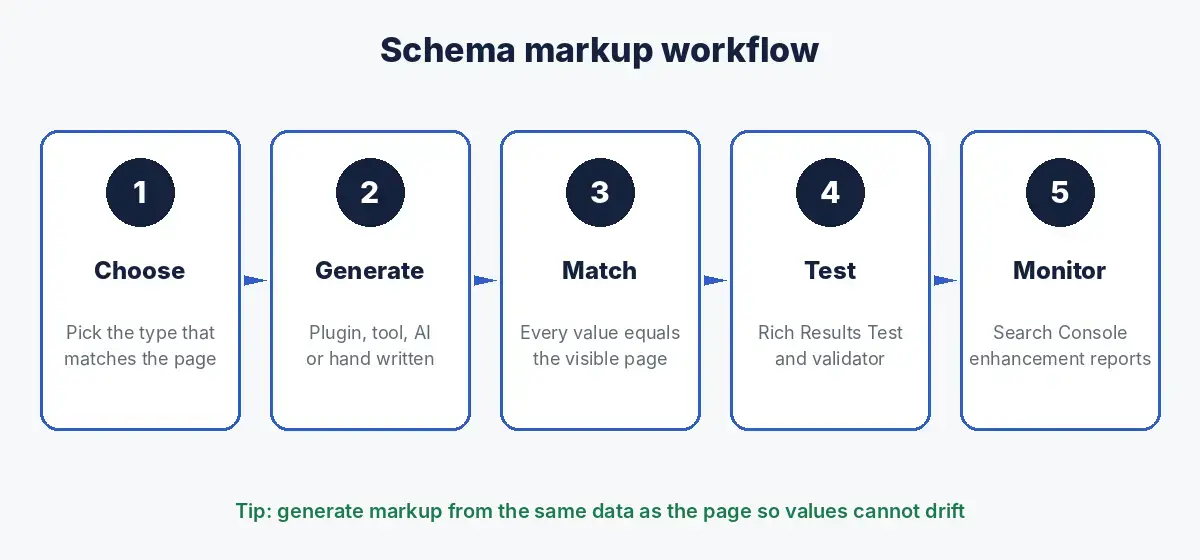
The short answer: schema markup is structured data, usually written in JSON LD, that describes a page’s content to search engines. The most useful types in 2026 are Organization, LocalBusiness, Product, Article, BreadcrumbList, WebSite, ProfilePage, SoftwareApplication and Service. Generate it with a CMS plugin, a schema tool or an AI assistant, but always check that every value matches the visible page, then test it in Google’s Rich Results Test and the Schema Markup Validator.
Which schema types still matter in 2026
Google’s search gallery lists the structured data types that can produce rich results. As of October 2026 it includes Article, Breadcrumb, Carousel, Course list, Dataset, Discussion forum, Education Q&A, Employer aggregate rating, Event, Image metadata, Job posting, Local business, Math solver, Movie, Organization, Product, Profile page, Q&A page, Recipe, Review snippet, Software app, Speakable, Subscription and paywalled content, Vacation rental and Video. FAQ and How to are no longer in the list.
| Business type | Schema to prioritise |
|---|---|
| Any business | Organization, WebSite, BreadcrumbList, ProfilePage for authors |
| Ecommerce | Product with Offer and genuine reviews, BreadcrumbList |
| Clinics, shops, restaurants | LocalBusiness subtype such as Dentist, Store or Restaurant |
| Software and apps | SoftwareApplication, Organization, Article for guides |
| Publishers and blogs | Article, ProfilePage, BreadcrumbList, Video where relevant |
| Service businesses | Organization, Service, LocalBusiness if you have premises |
Schema markup examples you can copy
Each example uses JSON LD, the format Google recommends where possible. Replace the example values with your own and remove any property you cannot fill accurately.
Organization schema example
Put this on your home page or about page so search engines can identify your organisation and connect it to its official profiles. Google’s Organization documentation explains the supported properties.
<script type="application/ld+json">
{
  "@context": "https://schema.org",
  "@type": "Organization",
  "@id": "https://www.example.com/#organization",
  "name": "Example Analytics",
  "url": "https://www.example.com/",
  "logo": "https://www.example.com/logo.png",
  "description": "Example Analytics is revenue analytics software for B2B finance teams.",
  "contactPoint": {
    "@type": "ContactPoint",
    "telephone": "+971 4 000 0000",
    "contactType": "sales"
  },
  "sameAs": [
    "https://www.linkedin.com/company/example",
    "https://www.youtube.com/@example"
  ]
}
</script>
LocalBusiness schema example
Use the most specific subtype, here Dentist, with address, phone and opening hours that match your Google Business Profile. See Google’s local business documentation.
<script type="application/ld+json">
{
  "@context": "https://schema.org",
  "@type": "Dentist",
  "@id": "https://www.example.com/jumeirah/#clinic",
  "name": "Example Dental Jumeirah",
  "image": "https://www.example.com/clinic.jpg",
  "url": "https://www.example.com/jumeirah/",
  "telephone": "+971 4 000 0000",
  "priceRange": "AED",
  "address": {
    "@type": "PostalAddress",
    "streetAddress": "Jumeirah Beach Road",
    "addressLocality": "Dubai",
    "addressCountry": "AE"
  },
  "geo": {
    "@type": "GeoCoordinates",
    "latitude": 25.2048,
    "longitude": 55.2708
  },
  "openingHoursSpecification": [
    {
      "@type": "OpeningHoursSpecification",
      "dayOfWeek": [
        "Monday",
        "Tuesday",
        "Wednesday",
        "Thursday",
        "Friday"
      ],
      "opens": "09:00",
      "closes": "21:00"
    }
  ],
  "parentOrganization": {
    "@id": "https://www.example.com/#organization"
  }
}
</script>
Product schema example with offer and reviews
For product pages, include the price, currency and availability shown on the page, plus genuine review ratings if they are visible. See Google’s Product documentation.
<script type="application/ld+json">
{
  "@context": "https://schema.org",
  "@type": "Product",
  "name": "Example Oak Dining Table",
  "image": [
    "https://www.example.com/table.jpg"
  ],
  "description": "Solid oak dining table that seats six.",
  "sku": "OAK6",
  "brand": {
    "@type": "Brand",
    "name": "Example Home"
  },
  "offers": {
    "@type": "Offer",
    "url": "https://www.example.com/oaktable/",
    "priceCurrency": "AED",
    "price": "2200",
    "availability": "https://schema.org/InStock",
    "itemCondition": "https://schema.org/NewCondition"
  },
  "aggregateRating": {
    "@type": "AggregateRating",
    "ratingValue": "4.7",
    "reviewCount": "38"
  }
}
</script>
Article schema example
Mark up blog posts and guides with the headline, image, author and publisher. Add datePublished and dateModified in ISO 8601 date format as well. See Google’s Article documentation.
<script type="application/ld+json">
{
  "@context": "https://schema.org",
  "@type": "Article",
  "headline": "How to Choose a Dining Table",
  "image": [
    "https://www.example.com/guide.jpg"
  ],
  "author": {
    "@type": "Person",
    "name": "Sara Haddad",
    "url": "https://www.example.com/team/sara/"
  },
  "publisher": {
    "@id": "https://www.example.com/#organization"
  }
}
</script>
BreadcrumbList schema example
Breadcrumbs show where a page sits in your site’s hierarchy. See Google’s breadcrumb documentation.
<script type="application/ld+json">
{
  "@context": "https://schema.org",
  "@type": "BreadcrumbList",
  "itemListElement": [
    {
      "@type": "ListItem",
      "position": 1,
      "name": "Furniture",
      "item": "https://www.example.com/furniture/"
    },
    {
      "@type": "ListItem",
      "position": 2,
      "name": "Dining tables",
      "item": "https://www.example.com/furniture/dining/"
    },
    {
      "@type": "ListItem",
      "position": 3,
      "name": "Oak Dining Table"
    }
  ]
}
</script>
WebSite schema example for site names
Google’s site names documentation says WebSite structured data on the home page is the most important signal for indicating your preferred site name.
<script type="application/ld+json">
{
  "@context": "https://schema.org",
  "@type": "WebSite",
  "name": "Example Analytics",
  "alternateName": "Example",
  "url": "https://www.example.com/"
}
</script>
Person and ProfilePage schema example
Use on author and team pages so expertise is connected to your organisation. See Google’s profile page documentation.
<script type="application/ld+json">
{
  "@context": "https://schema.org",
  "@type": "ProfilePage",
  "mainEntity": {
    "@type": "Person",
    "@id": "https://www.example.com/team/sara/#person",
    "name": "Sara Haddad",
    "jobTitle": "Head of Content",
    "worksFor": {
      "@id": "https://www.example.com/#organization"
    },
    "sameAs": [
      "https://www.linkedin.com/in/example"
    ]
  }
}
</script>
SoftwareApplication schema example
For software and apps, include the category, operating system, price and genuine ratings. See Google’s software app documentation.
<script type="application/ld+json">
{
  "@context": "https://schema.org",
  "@type": "SoftwareApplication",
  "name": "Example Analytics",
  "applicationCategory": "BusinessApplication",
  "operatingSystem": "Web",
  "offers": {
    "@type": "Offer",
    "price": "49",
    "priceCurrency": "USD"
  },
  "aggregateRating": {
    "@type": "AggregateRating",
    "ratingValue": "4.6",
    "ratingCount": "112"
  }
}
</script>
Service schema example
Service is not a Google rich result type, but it describes what a service business offers and where, which helps search engines and AI tools understand the page.
<script type="application/ld+json">
{
  "@context": "https://schema.org",
  "@type": "Service",
  "name": "Technical SEO audit",
  "serviceType": "Search engine optimisation",
  "provider": {
    "@id": "https://www.example.com/#organization"
  },
  "areaServed": [
    {
      "@type": "Country",
      "name": "United Arab Emirates"
    },
    {
      "@type": "Country",
      "name": "India"
    }
  ],
  "description": "A crawl, log and Search Console review with a prioritised fix list."
}
</script>
FAQPage schema example
FAQPage still describes question and answer content clearly, but FAQ rich results have been limited since 2023 to well known, authoritative government and health sites, and FAQ no longer appears in Google’s search gallery. Use it only for real FAQs visible on the page.
<script type="application/ld+json">
{
  "@context": "https://schema.org",
  "@type": "FAQPage",
  "mainEntity": [
    {
      "@type": "Question",
      "name": "Do you deliver outside Dubai?",
      "acceptedAnswer": {
        "@type": "Answer",
        "text": "Yes. We deliver across the UAE within five working days."
      }
    }
  ]
}
</script>
Connecting schema markup with @id
Notice that several examples reference https://www.example.com/#organization. Using the same @id everywhere tells search engines that the clinic, the author and the article all belong to one organisation, instead of describing several unconnected entities. Our guide to schema layers for AI search explains how to build this connected graph across a site.
Schema markup generator options
| Option | Best for | Watch out for |
|---|---|---|
| SEO plugins in your CMS, such as Rank Math or Yoast for WordPress | Article, Organization, breadcrumbs and basic product markup across a whole site | Duplicate markup when several plugins or the theme also output schema |
| Ecommerce platform apps | Product markup that stays in sync with prices and stock | Missing brand, ratings or return policy fields |
| Online schema generators | One off markup for a single page | Values copied by hand drift out of date |
| Schema platforms such as Schema App or WordLift | Large sites needing templates, governance and connected entities | Cost and setup time |
| AI assistants such as ChatGPT, Gemini or Claude | Drafting markup quickly from page content you paste in | Invented values; always validate and compare with the page |
| Hand written JSON LD in templates | Developers who want full control | Needs testing every time templates change |
For AI assistants, give the page content and ask for markup that uses only that information. Our list of ChatGPT prompts for SEO includes ten schema prompts you can copy.
How to test schema markup
- Paste the URL or code into Google’s Rich Results Test to see which rich results the page is eligible for and any errors.
- Check general schema.org validity in the Schema Markup Validator, which also covers types Google does not use for rich results, such as Service.
- Compare every value with the visible page: names, prices, ratings, addresses and hours.
- After publishing, monitor the enhancement reports in Search Console for errors across all pages using that template.
- Test again whenever templates, prices or plugins change.
Schema markup rules to follow
- Mark up what users can see. Google’s structured data guidelines require markup to represent the page’s main content.
- No fake reviews or ratings. Only mark up genuine reviews shown on the page.
- One source of markup per type. Disable duplicate output from themes and plugins.
- Keep it current. Update markup in the same release as price, stock, address or team changes.
- Valid markup is not a guarantee. Google decides whether to show rich results.
Common schema markup mistakes
- Prices or availability in markup that do not match the page.
- Organization names that differ across pages.
- Author markup pointing to a generic admin user.
- LocalBusiness markup on every page instead of the relevant location page.
- FAQPage markup on questions that are not visible on the page.
- Testing one page and assuming every page built from the template is correct.
Schema is one step in a wider review; our SEO checklist shows where it fits, and our guide to building a brand entity covers sameAs and knowledge graphs.
How Crawl To Click implements schema markup
At Crawl To Click, schema is part of engineering the system rather than a plugin setting. We audit what the site already outputs, remove duplicate and conflicting markup, then build one connected graph: Organization and WebSite on the home page, ProfilePage for authors, and the right page level types for products, services, locations and, for healthcare clients, medical entities. Markup is generated from the same data as the visible page wherever possible, so prices and details cannot drift, and every template is tested before release and monitored in Search Console afterwards. Learn more about our approach.
FAQs on schema markup
What is schema markup?
Structured data, usually written in JSON LD, that describes the content of a page to search engines using the schema.org vocabulary, such as which organisation, product, article or business the page is about.
What is the best schema markup generator?
For most WordPress sites, an SEO plugin covers the basics. Ecommerce platforms and schema platforms suit larger sites, and AI assistants can draft markup quickly, as long as you validate it and check it against the page.
Does schema markup improve rankings?
Schema helps search engines understand a page and can make it eligible for rich results, which can improve click through rates. It is not a direct ranking boost on its own.
Is FAQ schema still useful?
FAQ rich results have been limited since 2023 to authoritative government and health sites, and FAQ no longer appears in Google’s search gallery. FAQPage markup can still describe real FAQs, but do not expect rich results from it on most sites.
How do I test schema markup?
Use Google’s Rich Results Test for rich result eligibility and the Schema Markup Validator for general validity, then monitor Search Console enhancement reports after publishing.
Need help with schema across your site?
Plugins, themes and apps all adding their own markup? Request a schema audit and get one clean, connected setup.
Disclaimer: All names, URLs, prices and ratings in the examples are imaginary. Google’s supported structured data types and guidelines change over time; check the linked documentation before implementing.