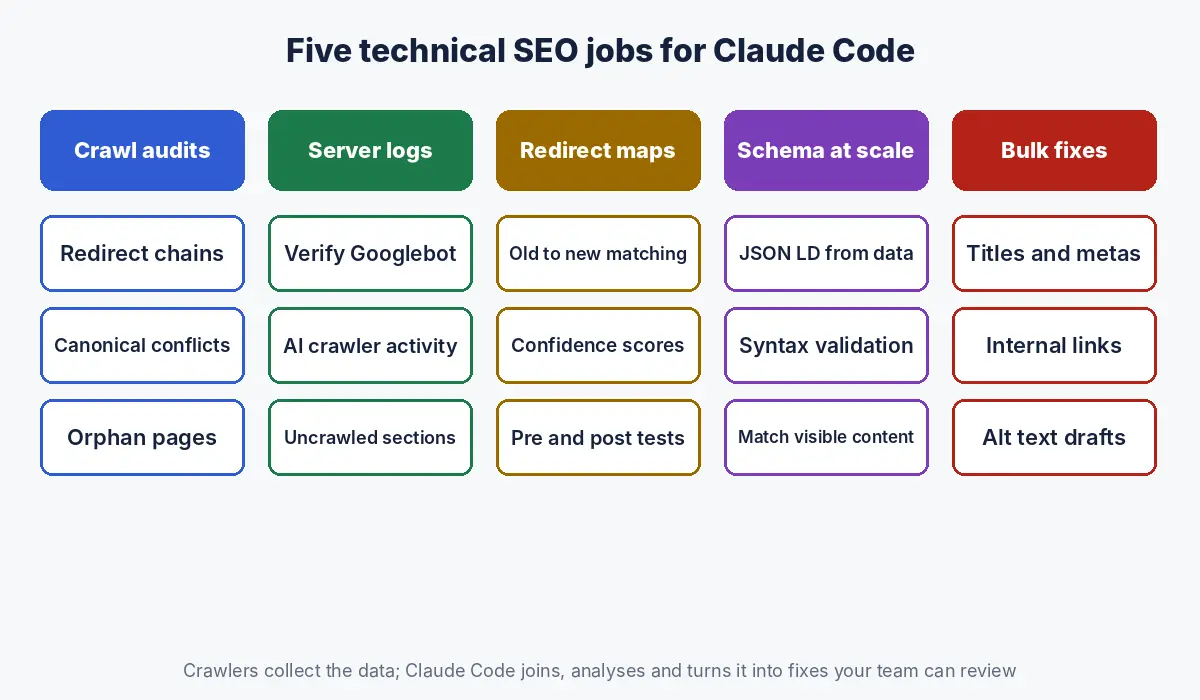
A technical SEO consultant gets a crawl export of 85,000 URLs from an ecommerce site the night before a migration review. Opening it in a spreadsheet takes four minutes and filtering crashes twice. In Claude Code, she points it at the folder, asks for redirect chains, canonicals pointing at non indexable pages, and product URLs missing from the new sitemap, and gets a summary table, the script that produced it, and three CSV files ready for the developers. The analysis she would have done anyway, done in a fraction of the time, with a method she can check.
The short answer: Claude Code is Anthropic’s agentic coding tool that reads files, writes and runs scripts, and edits files in a project folder, which makes it well suited to technical SEO work that involves large files: crawl exports, server logs, Search Console data, redirect maps, schema generation and bulk metadata changes. Set it up with a CLAUDE.md file describing the site and your standards, restrict what it may do with permission rules, ask it to show and save the scripts it uses, and test every change on a sample before it touches a live site.
What is Claude Code, and why use it for technical SEO?
Claude Code is an agentic coding tool that reads your files, edits them, runs commands and integrates with your development tools, available in the terminal, IDE extensions, a desktop app and the browser; for SEO it turns large exports and repetitive technical checks into scripted, repeatable analysis.
Anthropic describes Claude Code as a tool that reads your codebase, edits files, runs commands and integrates with your development tools (Claude Code documentation). The difference from chatting with Claude is that it works where your files are. Instead of pasting a sample of a crawl into a chat window, you let it open the full export, write a Python script, run it, and save the results.
| Claude chat | Claude Code | |
|---|---|---|
| Works on | Text and files you upload | Files and folders on your machine or a cloud session |
| Large files | Limited by what you can upload and paste | Processes full exports with scripts it writes and runs |
| Repeatability | Re run the conversation by hand | Saved scripts, CLAUDE.md instructions, scheduled tasks |
| Changes | Suggests edits | Edits files and runs commands, with your approval |
| Best for | Strategy, briefs, writing | Audits, logs, redirects, schema, bulk fixes |
For the wider picture of where Claude fits in SEO, including Projects and Skills, see our hub on Claude for SEO, and for performance data, our guide to analysing Search Console data with Claude.
What do you need to start using Claude Code for SEO?
You need a Claude subscription or Anthropic Console account, Claude Code installed or opened on the web or desktop, a project folder for each site, and the raw data: crawl exports, Search Console exports, server logs and, if you plan changes, access to the site’s code or CMS export.
| Item | Where it comes from | Notes |
|---|---|---|
| Claude Code access | Claude subscription or Console account (Claude Code documentation) | Runs in the terminal, VS Code, JetBrains, the desktop app or claude.ai/code |
| Project folder | One folder per site | Keep raw data, scripts and outputs in separate subfolders |
| Crawl export | Your crawler of choice, exported as CSV | Include status code, indexability, canonical, titles, inlinks |
| Search Console data | Performance, page indexing and crawl stats exports | Query and page level, two comparable periods |
| Server logs | Hosting provider or CDN | Usually the largest and most valuable file |
| Sitemaps | The live XML sitemaps | Compare against crawled and indexed URLs |
A folder layout that keeps work auditable:
site-audit/
  CLAUDE.md          instructions for this project
  data/raw/          untouched exports (never edited)
  data/processed/    cleaned files
  scripts/           every script Claude writes
  outputs/           CSVs and reports for the team
How should you set up CLAUDE.md for an SEO project?
Create a CLAUDE.md file in the project folder that describes the site, the data files, your SEO standards and the rules Claude must follow, because Claude Code reads it at the start of every session.
Anthropic’s documentation says a project CLAUDE.md sits in the project root or the .claude folder, is loaded in every session, and works best when kept under 200 lines; you can run /init to generate a starting file (Claude Code documentation). A template for an SEO audit project:
# Project: technical SEO audit for example.com

## Site
- Ecommerce, about 80k URLs. Markets: UAE (en, ar) and KSA (ar).
- Canonical host: https://www.example.com. Trailing slash: yes.

## Data
- data/raw/crawl.csv          full crawl export
- data/raw/gsc_pages.csv      Search Console pages, last 3 months
- data/raw/access.log         server logs, 30 days

## Rules
- Never modify files in data/raw/. Write outputs to outputs/.
- Save every script in scripts/ with a comment explaining it.
- Show row counts before and after every filter.
- Do not guess: if a column is missing, stop and ask.
- Report findings as: issue, count, example URLs, recommended fix.
The rule about row counts is the single most useful line. It makes silent filtering mistakes visible, which is where most automated analysis goes wrong.
How do you run a technical SEO audit from a crawl export with Claude Code?
Point Claude Code at the crawl export, ask it to profile the columns first, then run a defined list of checks, saving each check as a script and each result as a CSV with counts and example URLs.
A prompt that works well:
Read data/raw/crawl.csv. First, list the columns and row count.
Then check and report, with counts and 5 example URLs each:
1. Redirect chains (more than one hop) and redirect loops
2. Internal links pointing to 3xx, 4xx or 5xx URLs
3. Canonicals pointing to non 200 or noindex URLs
4. Indexable pages with duplicate titles or missing H1
5. Indexable pages with fewer than 2 internal inlinks
6. Sitemap URLs that are not indexable
Save each check as a script in scripts/ and each result in outputs/.| Check | Why it matters |
|---|---|
| Redirect chains | Google recommends permanent server side redirects whenever possible (Google Search Central); chains waste crawl and slow users |
| Links to non 200 URLs | Wastes crawling and passes users to errors or extra hops |
| Canonicals to non indexable pages | Sends conflicting signals; Google may ignore the canonical |
| Duplicate titles and missing H1 | Weak relevance signals and confusing results |
| Orphan or weakly linked pages | Hard for crawlers and users to find |
| Non indexable URLs in sitemaps | Sitemaps should list only canonical, indexable URLs |
Our technical SEO audit checklist lists the full set of checks to turn into scripts.
How do you analyse server log files with Claude Code?
Ask Claude Code to parse the access logs, separate verified Googlebot and AI crawler requests from everything else, and report which URLs and sections are crawled most, which are never crawled, and which return errors to bots.
Parse data/raw/access.log (combined log format).
1. Extract requests whose user agent contains Googlebot,
   bingbot, OAI-SearchBot, GPTBot, PerplexityBot or ClaudeBot.
2. For Googlebot, verify a sample of IPs with reverse DNS and
   flag any that do not resolve to googlebot.com or google.com.
3. Report requests per bot per day, top 50 URLs per bot,
   status codes per bot, and site sections never requested.
4. Compare crawled URLs with data/raw/crawl.csv indexable URLs.
Verifying matters because anyone can fake a user agent. Google’s documented method is a reverse DNS lookup on the IP, checking that the host is on googlebot.com, google.com or googleusercontent.com, then a forward lookup to confirm it matches the original IP; Google also publishes its crawler IP ranges as JSON files (Google Search Central).
Log analysis answers questions a crawler cannot: whether Googlebot spends its time on faceted URLs instead of products, how often new pages get their first crawl, and whether AI search crawlers such as OpenAI’s OAI SearchBot (OpenAI) reach your important pages at all; our guide to getting cited by Perplexity shows the same log check for PerplexityBot. For large sites, set the findings against Google’s guidance on managing crawl budget.
How do you build a redirect map for a site migration with Claude Code?
Give Claude Code the old URL list with traffic and links, the new URL list, and the matching rules, and have it map each old URL to the most relevant new URL, flag low confidence matches for human review, and output a file your developers can implement.
- Export old URLs with clicks, impressions and referring links from Search Console and your backlink tool.
- Export the new site’s URL list with titles and H1s from a staging crawl.
- Ask Claude Code to match by exact slug first, then by title and content similarity, and to score each match.
- Review every match below your confidence threshold and every high traffic URL by hand.
- Generate the redirect file in your server’s format, then have Claude Code test it against the staging site: every old URL should return one 301 to a 200 page.
- After launch, rerun the test on live URLs and monitor Search Console.
Google recommends a permanent server side redirect (301 or 308) whenever possible, and JavaScript redirects only as a last resort (Google Search Central).
How do you generate and validate schema markup at scale?
Have Claude Code generate JSON LD from your product, location or article data using a template, validate every output for syntax and required properties, and check that each value matches what is visible on the page.
Google’s structured data guidelines require markup to represent the main content of the page and not to describe content that is invisible to users (Google Search Central). A useful Claude Code task is a comparison script: fetch the rendered page, extract the visible price, name and rating, and flag any page where the schema disagrees. For templates by type, see our schema markup examples.
How do you make bulk SEO fixes safely with Claude Code?
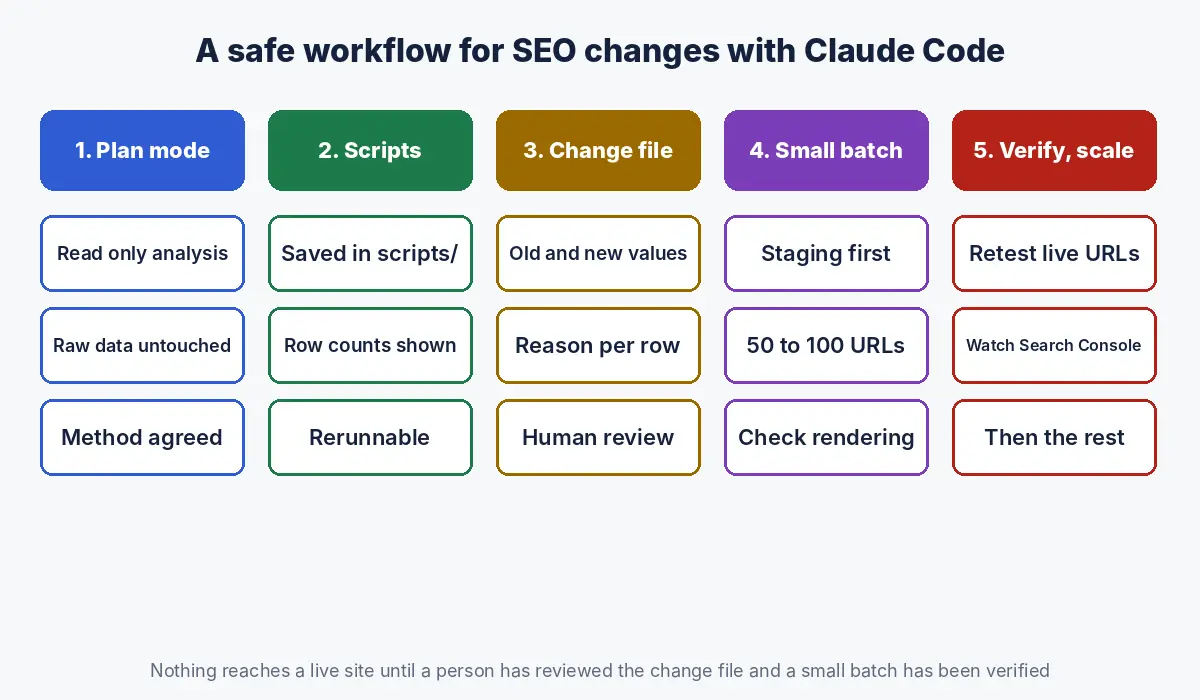
Make bulk fixes by having Claude Code produce a change file first (old value, new value, reason) for review, applying approved changes through your CMS import or API on a small batch, checking the result, and only then running the rest.
| Bulk task | Safe workflow |
|---|---|
| Rewrite titles and meta descriptions | Generate in a CSV with length checks and the target keyword per URL; review a sample of 50; import a batch of 100; check rendering |
| Fix internal links to redirected URLs | List every link source, old target and final target; update through the CMS or a database script on staging first |
| Add missing alt text | Draft from file names and page context; review for accuracy; never stuff keywords |
| Noindex or remove thin pages | Join crawl, Search Console and conversion data; review the list with the business before any change |
For sites generated from data, these same patterns apply at a larger scale; see our guide to programmatic SEO.
How do you keep Claude Code safe when it works on client data and live sites?
Keep Claude Code safe by starting analysis in plan mode, denying risky commands and sensitive files in its permission settings, keeping raw data read only, working on staging rather than production, and following your client agreements on where data may be processed.
Claude Code has permission modes, including a default mode that asks before each tool’s first use and a plan mode in which Claude reads files and runs read only commands but does not edit your source files; rules in a settings file can allow, ask or deny specific commands and file reads (Claude Code documentation). A cautious settings file for an audit project:
{
  "permissions": {
    "allow": ["Bash(python3 scripts/*)"],
    "ask":   ["Bash(curl *)"],
    "deny":  ["Read(./.env)", "Edit(./data/raw/**)", "Bash(git push *)"]
  }
}- Use a separate, limited CMS or server account for any task that writes changes.
- Keep API keys and passwords in environment files that Claude is denied from reading, never in CLAUDE.md or prompts.
- Review every diff before approving edits to templates, redirects or robots.txt.
- Remove personal data such as IP addresses from logs before sharing outputs outside the team.
How do you automate recurring technical SEO checks?
Turn checks you run every week or month into saved scripts and a written routine, then run them on a schedule with Claude Code’s scheduled tasks or from a script using its non interactive mode.
Claude Code supports scheduled tasks that run in the cloud or on your machine, and a non interactive mode for piping data and scripting (Claude Code documentation). Good candidates:
| Check | Frequency | Alert when |
|---|---|---|
| Status codes of top 500 pages | Daily | Any page returns non 200 |
| robots.txt and sitemap changes | Daily | File content changes |
| Indexable pages with noindex or wrong canonical | Weekly | Count rises above baseline |
| Googlebot and AI crawler activity from logs | Weekly | Crawl volume drops sharply |
| Search Console clicks by template | Weekly | A template loses more than a set share of clicks |
Claude Code vs crawler tools: which should you use for technical SEO?
Use crawler tools to collect data and Claude Code to analyse, combine and act on it; they complement each other rather than compete.
| Need | Crawler tool | Claude Code |
|---|---|---|
| Crawl and render a site | Built for it | Can script small crawls; not a replacement |
| Standard issue reports | Built in | Only what you ask for |
| Joining crawl, logs, Search Console and sales data | Limited | Strong |
| Custom checks for one site’s quirks | Custom extraction rules | Strong, in plain language |
| Generating fixes (redirect files, schema, CSVs) | Limited | Strong |
| Repeatable, documented method | Saved configurations | Saved scripts and CLAUDE.md |
What are the common mistakes when using Claude Code for SEO?
| Mistake | Fix |
|---|---|
| Trusting a summary without seeing the script | Ask for the script and row counts every time |
| Letting it edit raw exports | Deny edits to data/raw; work on copies |
| Running bulk changes straight on production | Change file, review, small batch, verify, then scale |
| Accepting matches in redirect maps blindly | Human review for low confidence and high traffic URLs |
| Treating spoofed bot traffic as Googlebot | Verify with reverse DNS or Google’s IP ranges |
| Putting credentials in prompts or CLAUDE.md | Environment files with read access denied |
How Crawl To Click uses Claude Code for technical SEO
Crawl To Click is an SEO and AI visibility consultancy, and we use Claude Code as an analyst that writes its working down. Each technical engagement gets its own project with instructions about the site, the data and the rules, raw exports kept read only, and every finding backed by a saved script, row counts and example URLs. We use it to join crawls with server logs and Search Console data, build and test redirect maps, check schema against visible content and prepare bulk fixes for developers, with people reviewing every change before it reaches a live site. We apply this to ecommerce catalogues, property portals, software sites, publishers, marketplaces and multilingual sites in the UAE and India.
FAQs on Claude Code for SEO
What is Claude Code used for in SEO?
Claude Code is used in SEO for technical and data work: auditing crawl exports, analysing server logs, building redirect maps for migrations, generating and validating schema markup, preparing bulk title and metadata changes, and running scheduled technical checks.
Do I need to know how to code to use Claude Code for SEO?
You do not need to write code yourself, because Claude Code writes and runs the scripts. You do need to understand the SEO checks you are asking for and to review the method, row counts and results it reports.
Can Claude Code crawl a website?
Claude Code can write and run scripts that fetch pages, which works for small checks such as status codes for a list of URLs. For full site crawls with rendering, a dedicated crawler is faster and more reliable; Claude Code is best used to analyse the export.
Is it safe to use Claude Code on client data?
It can be, with controls: follow your client agreements on data processing, deny access to credential files and raw data edits in the permission settings, remove personal data such as IP addresses from logs, and review every change before it reaches a live site.
How does Claude Code help with site migrations?
Claude Code helps with migrations by matching old URLs to new ones from exports, scoring each match for review, generating the redirect file in your server’s format and testing that every old URL returns a single 301 to a working page before and after launch.
Can Claude Code analyse server logs for Googlebot?
Yes. Claude Code can parse access logs, filter Googlebot and AI crawler requests, verify Googlebot through reverse DNS as Google documents, and report crawl frequency, status codes and uncrawled sections.
Stuck on a technical SEO problem?
Migration coming up, logs you have never analysed, or an audit that keeps stalling in spreadsheets? Get a second pair of eyes on it.
Disclaimer: This article reflects Anthropic and Google documentation as of the dates stated. Claude Code features change frequently; check the current documentation. Code and prompts are examples to adapt and test, not production ready scripts.