The short answer: a backlink audit reviews the links pointing to a website to understand which build authority, which are worthless, which could breach Google’s link spam policies, and which opportunities are being missed. For most sites, the outcome is not a disavow file: Google says most sites will not need the disavow tool, that it can assess which links to trust on its own, and that disavowing is for a considerable number of spammy links that have caused, or are likely to cause, a manual action. The useful work is usually reclaiming lost links, fixing links that point to broken pages, qualifying paid links correctly and finding where competitors earn mentions you do not.
Backlink audits are often sold on fear: a tool flags thousands of “toxic” links and recommends disavowing them. That advice is usually wrong, and occasionally harmful, because it can throw away links that help. This guide explains what Google actually says about bad links and disavowing, when a backlink audit is worth doing, which data to use, how to identify links that genuinely breach Google’s policies, how to handle a manual action, how to use the audit to find opportunities, and includes a sample backlink audit report.
What is a backlink audit?
A backlink audit is a structured review of the external links pointing to a site, covering their sources, the pages they point to, anchor text, link attributes and patterns, to judge their value and risk and to plan reclaiming, cleaning up or building links.
| Question | What the audit answers |
|---|---|
| Value | Which links and linking sites actually build authority and send visitors? |
| Risk | Are there patterns that breach Google’s link spam policies, such as paid links passing ranking credit? |
| Waste | Do links point to pages that redirect, return errors or no longer exist? |
| Gaps | Where do competitors earn links and mentions that you do not? |
| Action | Reclaim, redirect, qualify, request removal, disavow or simply ignore? |
A backlink audit is one part of a full SEO audit; our guide to SEO audits in Dubai explains how the pieces fit together.
What does Google say about bad links and disavowing?
Google says it can assess which links to trust without additional guidance, so most sites will not need the disavow tool, which is meant only for sites with a considerable number of spammy, artificial or low quality links that have caused or are likely to cause a manual action (Google Search Console Help).
- When Google launched its December 2022 link spam update using SpamBrain, it said that spammy links are neutralised and any credit passed by those unnatural links is lost (Search Engine Land). In other words, Google mostly ignores bad links rather than punishing the site.
- Google’s John Mueller wrote in May 2024 that “the concept of toxic links is made up by SEO tools so that you pay them regularly” (Search Engine Roundtable).
- Where links are part of a deliberate scheme, Google can issue a manual action for unnatural links, and fixing it requires removing or disavowing them and requesting a review (Search Console Help).
The practical conclusion: worry about links you or your agencies created to manipulate rankings, not about the random low quality links every site attracts.
When do you actually need a backlink audit?
You need a backlink audit when Search Console shows a manual action for unnatural links, when you or a previous agency bought links or ran link schemes, before a migration or rebrand, when acquiring a domain or business, or when planning a link and digital PR programme.
| Situation | Audit focus |
|---|---|
| Manual action for unnatural links | Find and remove or disavow the links behind it; reconsideration request |
| Previous agency built links | Identify paid, exchanged or network links and their risk |
| Migration or redesign | List pages with links so they are redirected, not lost |
| Buying a domain or business | Check the link history for schemes or penalties |
| Planning link building or PR | Benchmark against competitors; find gaps |
| Rankings dropped and someone blames “toxic links” | Usually rule links out and look elsewhere |
Which data should a backlink audit use?
Combine Search Console’s Links report, which shows top linked pages, top linking sites and link text and allows exports of up to 100,000 rows but is not a complete list (Search Console Help), with one or two third party backlink indexes and your analytics referral data.
| Source | Strength | Limit |
|---|---|---|
| Search Console Links report | Google’s own view of links it knows | Sampled; not every link; may include removed links |
| Third party backlink tools | Large indexes, history, lost and new links | Each tool sees a different subset; scores are their own |
| Analytics referrals | Which links actually send visitors | Only links people click |
| Crawl of your site | Which linked pages now redirect or return errors | Needs to be matched with link data |
How do you build a backlink inventory?
Export links from Search Console and your backlink tools, deduplicate by linking page, group by linking domain, and record for each link the target page, anchor text, link attribute, first seen date and whether the target page still returns a 200 status.
linking_domain | linking_url | target_url | target_status | anchor_text
| rel (follow/nofollow/sponsored/ugc) | first_seen | lost (y/n)
| link_type (editorial/directory/forum/press/paid/partner/unknown)
| referral_visits_12m | risk (none/low/review/high) | action | notes
Grouping by domain matters. Ten thousand links from one site, often a footer or sidebar, are one relationship, not ten thousand problems.
How do you identify links that breach Google’s policies?
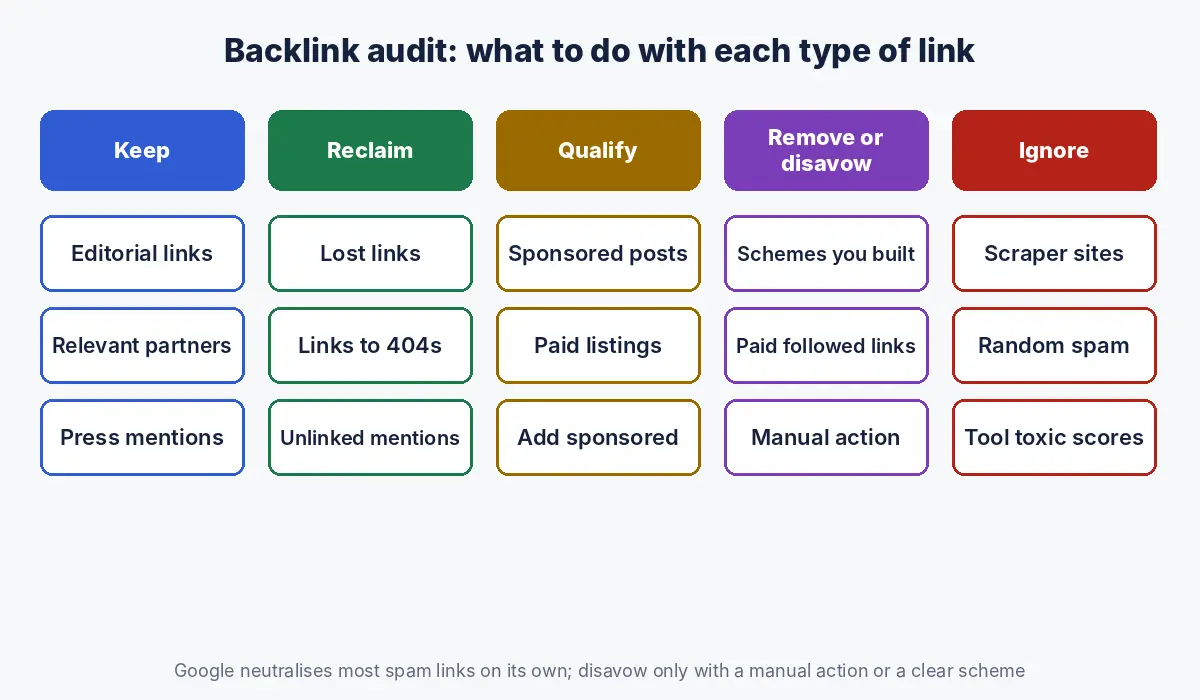
Look for patterns that match Google’s link spam examples rather than for low authority sites: buying or selling links that pass ranking credit, excessive link exchanges, automated link creation, paid articles with followed links, low quality directory or bookmark links, links in widgets, sitewide footer or template links, and forum comments with optimised anchors (Google Search Central).
| Pattern | How it shows in the data | Risk |
|---|---|---|
| Paid links passing credit | Sponsored posts or listings with followed links and exact match anchors | Higher if you or an agency paid for them |
| Private blog networks | Many unrelated sites, similar templates, links to a few commercial pages | High if built deliberately |
| Excessive link exchanges | Reciprocal partner pages | Moderate |
| Sitewide footer or widget links | Thousands of links from one domain | Usually low; check if paid |
| Exact match anchor text concentration | Large share of anchors are commercial keywords | Signals manipulation if unnatural |
| Random scraper and spam sites | Low quality sites copying content | Very low; Google ignores them |
Use anchor text distribution as a signal, not a verdict. Brand names, URLs and generic phrases dominate a natural profile; a profile where most anchors are “best SEO company Dubai” style phrases was almost certainly built.
What should you do about “toxic” link scores?
Treat toxic or spam scores as a tool’s prompt for manual review, not as a reason to disavow; they are calculated by each tool with its own rules, Google does not use them, and disavowing on the basis of a score alone can remove links that help.
Mueller’s comment that toxic links are a concept made up by SEO tools (Search Engine Roundtable) does not mean every link is harmless; links you paid for to manipulate rankings remain a risk under Google’s spam policies. The audit’s job is to separate the two.
How do you handle a manual action for unnatural links?
Export your links from Search Console, identify the links that breach Google’s policies, ask site owners to remove them or stop them passing ranking credit, disavow the ones you cannot remove, then submit a reconsideration request documenting what you did; Google warns that disavowing all backlinks without trying to remove them may lead to the request being rejected (Search Console Help).
- Confirm the manual action and its scope in Search Console’s Manual actions report.
- Build the inventory and flag links that match Google’s link spam examples.
- Contact site owners to remove the links or add nofollow or sponsored attributes; keep records.
- Disavow the remaining violating links at domain level where the whole site is a scheme.
- Submit a reconsideration request explaining the cause, the links removed and the links disavowed.
- Change the practice that created the links, or the problem returns.
When should you use the disavow tool, and how?
Use the disavow tool only when you have a considerable number of spammy, artificial or low quality links pointing to your site and they have caused or are likely to cause a manual action (Google Search Console Help), typically after a link scheme you or a supplier ran.
| Situation | Disavow? |
|---|---|
| Manual action for unnatural links | Yes, for links you cannot get removed |
| Known paid link campaign or network built for you | Yes, if you cannot remove or qualify the links |
| Random spam, scraper and directory links you did not build | No; Google ignores them |
| Tool shows a high toxic score | No, not on that basis alone |
| Rankings dropped after a core update | Usually no; look at content and quality first |
# Disavow file: plain text, UTF-8, one entry per line
# Lines starting with # are comments
# Whole domains (use when the entire site is a scheme)
domain:example-link-network.com
domain:paid-links-blog.net
# Individual URLs
https://some-directory.example/listing/12345
Keep a copy of every version of the file and the reason for each entry. Uploading a new file replaces the old one, so add to it rather than starting again.
How do you audit paid, sponsored and partner links?
Check every link you pay for or exchange, including sponsored articles, directory listings, event sponsorships and partner pages, and make sure each one is qualified; Google says paid links are not a violation when they use rel sponsored or rel nofollow (Google Search Central).
- List sponsorships, paid listings and advertorials from finance records and marketing plans, not just from link tools.
- Ask publishers to add the sponsored attribute where it is missing.
- Review what previous agencies delivered; “guest posts” bought in bulk are often paid links without attributes.
- Put link practices in your agency contracts; our guide to SEO contract red flags in the UAE covers what to agree before work starts.
How do you use a backlink audit to find opportunities?
Use the audit to reclaim value you already earned and to find gaps: redirect broken pages that still have links, recover lost links, turn unlinked brand mentions into links, and study where competitors earn editorial links and mentions.
| Opportunity | How to find it | Action |
|---|---|---|
| Links to pages that 404 or redirect in chains | Target status in the inventory | 301 to the closest live page (Google Search Central) |
| Lost links | Lost link reports in backlink tools | Ask the site to restore or update the link |
| Unlinked brand mentions | Mention searches | Request a link where it helps readers |
| Competitor link gaps | Domains linking to two or more competitors but not you | Pitch data, expertise or partnerships |
| Mentions that shape AI answers | Citation source mapping | Earn mentions on cited sites |
Mentions matter beyond links. In Ahrefs’ study of 75,000 brands, branded web mentions correlated more strongly with visibility in Google AI Overviews (0.664) than backlinks did (0.218) (Ahrefs). Our guide to citation source mapping shows how to find the sites that matter for AI answers in your category.
What does a sample backlink audit report look like?
A sample backlink audit report summarises the profile, states plainly whether there is any real risk, and lists actions for value, risk and opportunities with owners and priorities.
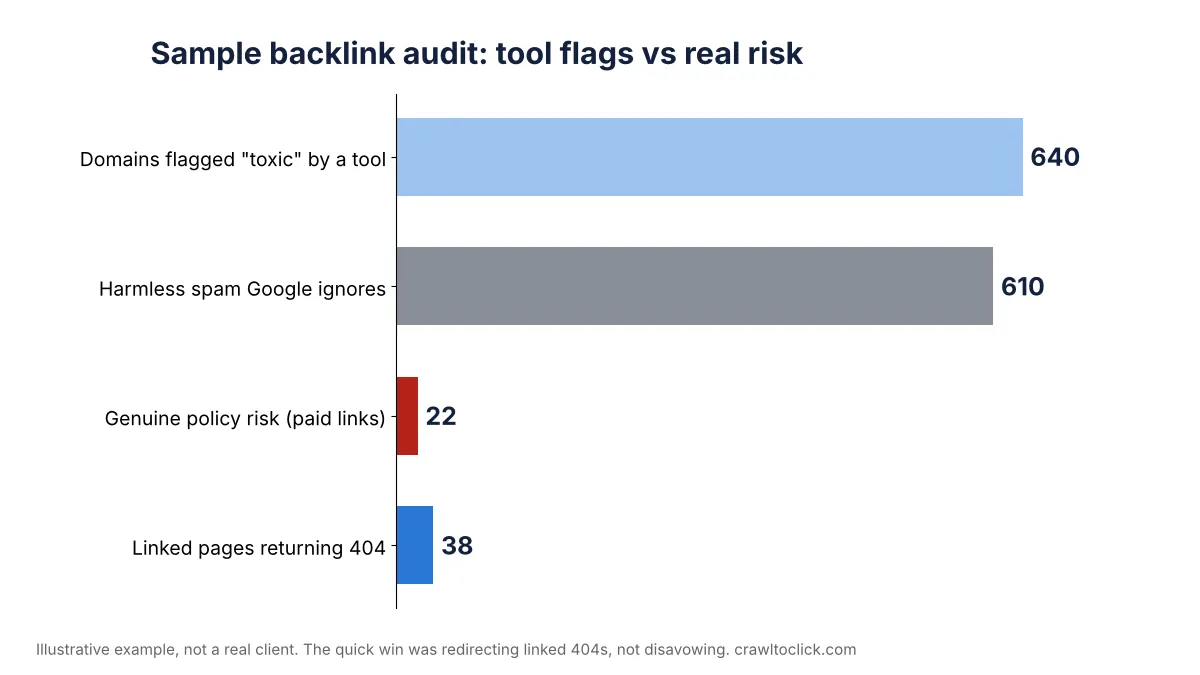
Sample summary (illustrative): “A Dubai logistics company with about 1,900 referring domains. A tool flags 640 domains as toxic; on review, 610 are scraper and spam sites Google ignores. 22 links come from paid guest posts bought by a previous agency in 2023, with exact match anchors and no sponsored attribute. 38 pages with links from 140 domains return 404 after a 2024 redesign. There is no manual action. Recommended: no broad disavow; qualify or remove the 22 paid links; redirect the 38 broken pages; pursue 30 competitor gap domains.”
| Measure | Value |
|---|---|
| Referring domains | About 1,900 |
| Flagged “toxic” by tool | 640 domains |
| Confirmed policy risk after review | 22 links (paid guest posts) |
| Linked pages returning 404 | 38 pages, 140 linking domains |
| Manual action | None |
| # | Finding | Evidence | Impact | Fix | Owner | Priority |
|---|---|---|---|---|---|---|
| 1 | 38 linked pages return 404 | Inventory target status | Link value lost | 301 each to the closest live page | Developer | High, quick win |
| 2 | 22 paid guest post links without attributes | Agency invoices; anchors; publisher pages | Policy risk | Ask publishers to add sponsored or remove; disavow the rest | SEO | High |
| 3 | 610 spam and scraper domains flagged by tool | Manual review sample | None | No action; Google ignores them | SEO | None |
| 4 | 30 domains link to two or more competitors but not us | Link gap analysis | Missed authority | Outreach with industry data and expert comment | Marketing | Medium |
| 5 | 45 unlinked brand mentions in trade media | Mention search | Missed links and AI mentions | Request links where helpful | Marketing | Medium |
The company and figures above are illustrative, not a real client. To write up your findings in this format, use our free SEO audit report template.
What are the common backlink audit mistakes?
| Mistake | Better approach |
|---|---|
| Disavowing everything a tool flags | Review manually; disavow only real schemes |
| Blaming links for every ranking drop | Check content, intent and technical causes first |
| Ignoring links to broken pages | Redirect linked 404s; it is the fastest win |
| Auditing only third party tool data | Include Search Console’s Links report |
| Forgetting paid links from sponsorships | Check finance and marketing records |
| Replacing the disavow file without the old entries | Maintain one versioned file |
| Treating link counts as the goal | Focus on relevant, editorial links and mentions |
How Crawl To Click runs backlink audits
Crawl To Click is an SEO and AI visibility consultancy, and our backlink audits start by separating noise from risk: we combine Search Console with third party link data, group links by domain, review flagged links manually against Google’s link spam policies, check paid and partner links against what was actually bought, and only recommend disavowing when there is a manual action or a clear scheme. Most of the value comes from redirecting linked pages that broke, reclaiming lost links and finding competitor and mention gaps. We audit link profiles for logistics, software, healthcare, education, property and ecommerce businesses in the UAE and India, and connect link work to LLM SEO where AI visibility is a goal.
FAQs on backlink audits
What is a backlink audit?
A backlink audit reviews the external links pointing to a website to judge which build authority, which are worthless, which could breach Google’s link spam policies, and which opportunities are being missed, ending with actions such as redirecting linked pages, reclaiming lost links, qualifying paid links or, rarely, disavowing.
Do I need to disavow toxic backlinks?
Usually not. Google says most sites will not need the disavow tool and that it is for a considerable number of spammy or artificial links that have caused or are likely to cause a manual action. Toxic scores come from SEO tools, not from Google.
Can bad backlinks hurt my rankings?
Google says its systems neutralise spammy links so they pass no credit, rather than harming the site. Links that are part of a deliberate scheme, such as paid links passing ranking credit, can lead to a manual action for unnatural links.
How do I fix a manual action for unnatural links?
Export your links, identify those that breach Google’s link spam policies, ask site owners to remove them or add nofollow or sponsored attributes, disavow those you cannot remove, and submit a reconsideration request documenting the work.
How often should I do a backlink audit?
A full backlink audit once a year is enough for most sites, plus an audit after a manual action, before a migration or acquisition, or after working with a link building supplier whose methods you are unsure of.
Are paid links against Google’s guidelines?
Paid links are not a violation when they are qualified with the rel sponsored or rel nofollow attribute. Paid links that pass ranking credit are listed as link spam in Google’s spam policies.
Worried about your link profile?
Before you disavow anything, get an independent view of what is genuinely risky and what is worth reclaiming. Request a backlink audit.
Disclaimer: This article reflects Google documentation and published statements as of the dates stated. The sample report is illustrative and does not describe a real business. Disavowing links can affect rankings; act on a manual review, not on tool scores alone.