The short answer: an SEO audit report template is a ready made structure for writing up an audit so that people can act on it: a summary of what limits organic traffic and leads, one row per finding with evidence, impact, effort, fix, owner and deadline, a baseline of metrics to measure against, and a checklist showing what was reviewed. The free template below does this in a single workbook with five tabs, calculates priority automatically from impact and effort, and works in both Google Sheets and Excel.
Download the free SEO audit report template (XLSX, works in Google Sheets and Excel)
Most audit reports fail at the same point: they list problems without saying which matter, who fixes them or how anyone will know they worked. A template fixes that by forcing the same structure every time. This guide explains what each tab contains, how to fill it in, how priority is calculated, what a completed example looks like, and the mistakes to avoid. If you are on the receiving end of an audit, our guide on how to read an SEO audit report explains how to judge one.
What is in the SEO audit report template?
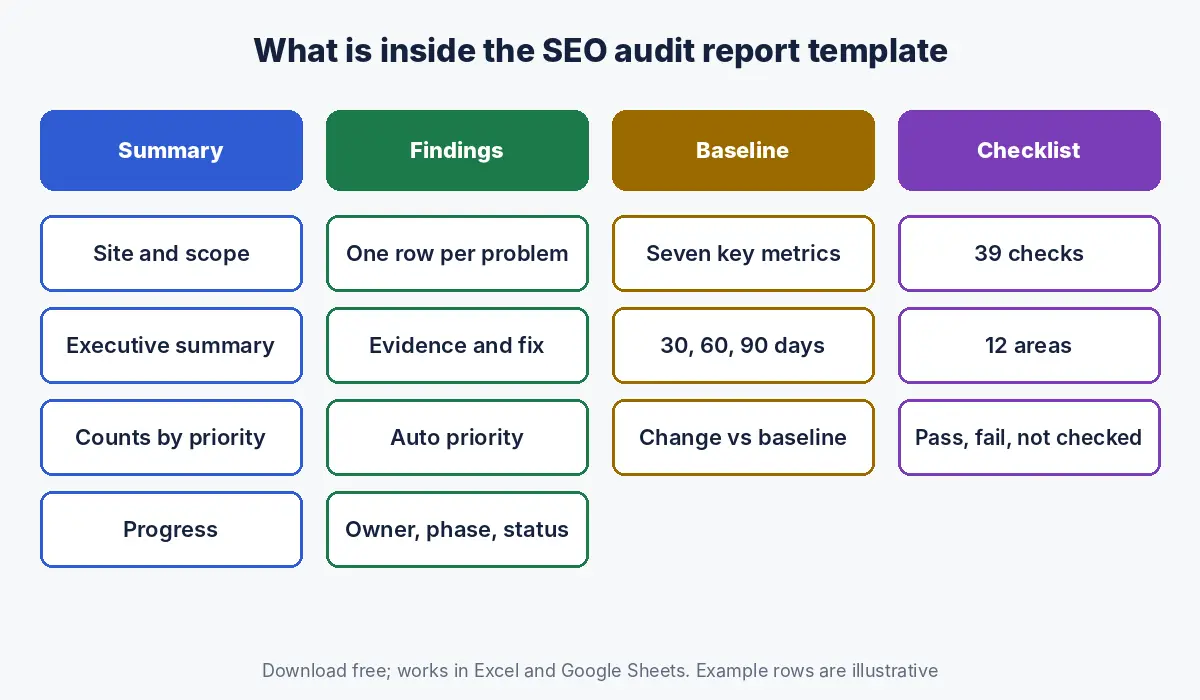
The template has five tabs: How to use, Summary, Findings, Baseline and Checklist, with yellow cells for inputs and formulas that update the summary automatically.
| Tab | What it contains | Who uses it |
|---|---|---|
| How to use | Instructions, the priority rules and how to import into Google Sheets | Whoever writes the audit |
| Summary | Site, audit date, scope, executive summary, findings counted by priority and phase, progress, checklist result | Founders, marketing heads, clients |
| Findings | One row per problem: area, finding, pages affected, example URLs, evidence, impact, effort, calculated priority, fix, owner, phase, due date, status | SEO, developers, content team |
| Baseline | Seven key metrics with baseline values and 30, 60 and 90 day columns, plus change against baseline | Whoever reports results |
| Checklist | 39 checks across 12 areas, each marked Pass, Fail or Not checked | Auditor, for coverage |
How do you fill in the SEO audit report template?
Fill the template in this order: scope on the Summary tab, the Checklist as you audit, a Findings row for every distinct problem, the Baseline before any fixes, and the executive summary last, once you know which findings matter most.
- Scope first. On the Summary tab, enter the site, audit date, what was reviewed (pages, languages, data sources, time period) and what was not.
- Work through the Checklist. Mark each check Pass, Fail or Not checked. The Summary tab counts the results.
- Log each problem once in Findings. One row per distinct issue, not per URL; put the number of pages affected and a few example URLs in their own columns.
- Add evidence. Name the source for every finding: Search Console report, crawl export, analytics, manual review.
- Rate impact and effort. Choose from the dropdowns; the Priority column fills itself.
- Write a specific fix, owner and phase. “Add hreflang pairs for every English and Arabic page”, not “fix hreflang”.
- Record the baseline before anything changes.
- Write the executive summary last, in three to five sentences, naming the few findings that matter most.
How does the template calculate priority?
Priority is calculated from impact and effort: high impact and low effort becomes 1. Fix now, high impact with more effort becomes 2. Plan next, lower impact and low effort becomes 3. Batch, and lower impact with more effort becomes 4. Park.
| Low effort | Medium or high effort | |
|---|---|---|
| High impact | 1. Fix now | 2. Plan next |
| Medium or low impact | 3. Batch | 4. Park |
Impact should reflect the effect on revenue pages, traffic and leads, not the severity label a crawling tool gave the issue. A missing meta keywords tag, which Google has said it does not use in web ranking (Google Search Central), is low impact however many pages it appears on; an important page blocked from indexing is high impact even if it is a single URL.
What should each finding in an SEO audit report include?
Each finding should include a plain language description, the number of pages affected with examples, the evidence and its source, the impact on the business, a specific fix, an owner, a phase and a status.
| Column | Good example | Weak example |
|---|---|---|
| Finding | Arabic pages canonicalise to English and are not indexed | Canonical issues |
| Pages affected | 80, all /ar/ pages | Many |
| Evidence | Crawl: canonical on Arabic template points to English URL; Search Console shows Arabic pages excluded | Tool flagged |
| Impact | High: Arabic search visibility close to zero | Error |
| Fix | Self referencing canonicals on Arabic pages and hreflang pairs | Fix canonicals |
| Owner and phase | Developer, days 1 to 30 | SEO |
Which metrics belong on the baseline tab?
The baseline tab should hold the handful of metrics that the audit’s fixes are meant to move: organic clicks and impressions, indexed pages, the share of revenue keywords on page one, organic leads, the share of mobile pages with good Core Web Vitals, and, increasingly, the AI mention rate.
| Metric | Source | Why it is there |
|---|---|---|
| Organic clicks and impressions | Search Console | Overall visibility and demand |
| Indexed pages | Search Console page indexing | Shows indexing fixes working |
| Revenue keywords on page one | Rank tracker | Ties rankings to business value |
| Organic leads | Analytics key events | The outcome that matters |
| Mobile pages with good Core Web Vitals | Search Console, against Google’s thresholds (Google Search Central) | Shows speed work |
| AI mention rate | Prompt log | Visibility in AI answers |
For month to month reporting after the audit, use our separate SEO report template, which tracks the same kinds of metrics over time.
What does a completed SEO audit report template look like?
The template ships with five illustrative findings for a fictional Dubai interior design firm, so you can see the expected level of detail before replacing them with your own.
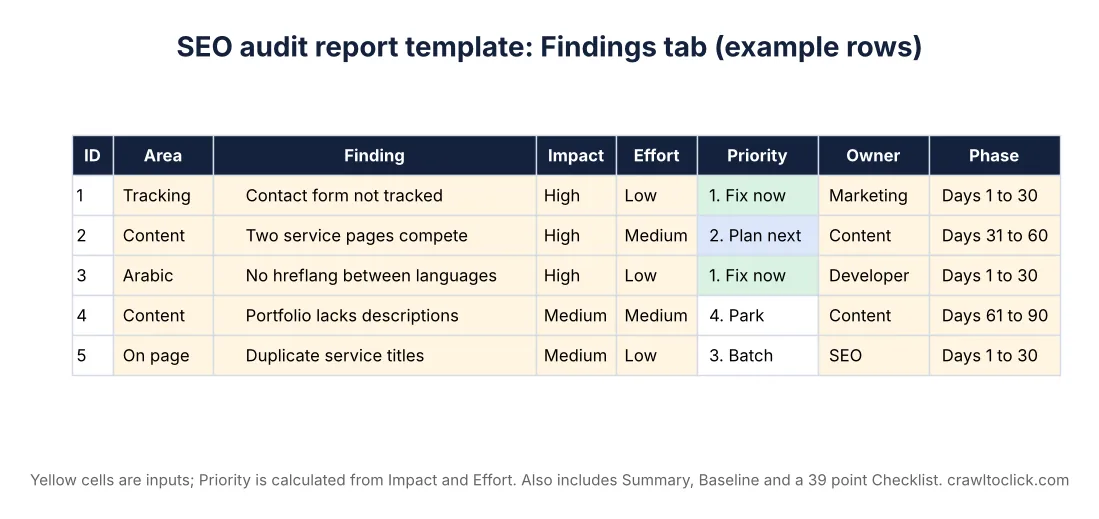
Sample summary (illustrative): “Organic enquiries are flat despite rising impressions. Service pages rank on page two because they overlap, Arabic pages are not paired with English through hreflang, and the contact form is not tracked, so leads from search are undercounted. Fix tracking and hreflang first, then merge overlapping pages.”
| # | Finding | Impact | Effort | Priority | Owner | Phase |
|---|---|---|---|---|---|---|
| 1 | Contact form submissions not tracked | High | Low | 1. Fix now | Marketing | Days 1 to 30 |
| 2 | Two service pages compete for the same queries | High | Medium | 2. Plan next | Content | Days 31 to 60 |
| 3 | No hreflang between English and Arabic | High | Low | 1. Fix now | Developer | Days 1 to 30 |
| 4 | Portfolio pages lack project descriptions | Medium | Medium | 4. Park | Content | Days 61 to 90 |
| 5 | Duplicate titles across service pages | Medium | Low | 3. Batch | SEO | Days 1 to 30 |
The firm and findings are illustrative, not a real client.
What does the 39 point checklist cover?
The checklist covers twelve areas, indexing, technical, speed, content, on page, internal links, structured data, local, Arabic and international, AI visibility, tracking and security, so the report shows what was reviewed as well as what was found.
| Area | Example checks |
|---|---|
| Indexing | Important pages indexed; no important pages blocked or noindexed; canonicals correct; clean sitemap |
| Technical and speed | No redirect chains; no links to error pages; HTTPS everywhere; Core Web Vitals pass on main templates |
| Content and on page | Clear intent per page; no competing pages; current facts; unique titles and H1s |
| Structured data and local | Organization or LocalBusiness markup matching visible content; Business Profile accurate; reviews answered |
| Arabic and AI | Arabic pages indexable and paired; AI search crawlers allowed; brand described correctly in AI answers |
| Tracking and security | Forms, calls and WhatsApp tracked; no security issues or manual actions; software up to date |
For the full technical detail behind these checks, see our technical SEO audit checklist, and for content decisions, our guide to a content audit.
How do you use the template in Google Sheets?
Download the XLSX file, open Google Sheets, choose File, then Import, upload the file and select Replace spreadsheet; the dropdowns, formulas and formatting carry over.
Download the free SEO audit report template (XLSX, works in Google Sheets and Excel)
Share the Findings tab with developers and content owners so they can update the Status column themselves; the Summary tab’s progress figure then updates without anyone rebuilding the report.
How do you present an SEO audit report to decision makers?
Present the audit in a short meeting built around the Summary tab: the situation in two sentences, the three to five findings that matter most with their expected effect, what each costs in time or money, and the decisions you need from the people in the room.
| Audience | What they need from the report | Which tab to show |
|---|---|---|
| Founder or managing director | What is holding back leads, what fixing it costs, and what to approve | Summary |
| Marketing head | Priorities, owners, timeline and how results will be measured | Summary and Baseline |
| Developers | Exact issues, affected URLs, evidence and acceptance criteria | Findings |
| Content team | Pages to merge, update or create, with reasons | Findings, filtered by owner |
| Agency or freelancer | Coverage and open items | Checklist and Findings |
Send the workbook after the meeting, not before, so the discussion starts from priorities rather than from the longest tab.
What are the common mistakes when writing an SEO audit report?
| Mistake | Better approach |
|---|---|
| One row per URL, producing thousands of rows | One row per problem, with pages affected and examples |
| Everything marked high priority | Rate impact and effort honestly; let the matrix decide |
| No evidence column | Name the source for every finding |
| Fixes like “improve SEO” | Specific, testable actions |
| No owner or deadline | Assign every finding to a person and a phase |
| No baseline | Record metrics before fixes so results can be shown |
| Promising rankings | Google says no one can guarantee a number one ranking (Google Search Central) |
How Crawl To Click uses this template
Crawl To Click is an SEO and AI visibility consultancy, and this template is a simplified version of the structure we use for every audit: a short summary, one row per problem with evidence and a specific fix, priorities from impact and effort, owners and phases, a baseline, and a record of what was checked. We use it for clinics, property brokers, schools, software companies, ecommerce stores and professional services firms in the UAE and India. For what a professional audit typically costs by scope, see our guide to SEO audit cost in Dubai, and for what it should include, our guide to SEO audits in Dubai.
FAQs on SEO audit report templates
What should an SEO audit report include?
An SEO audit report should include an executive summary, a prioritised list of findings with evidence, impact, a specific fix, an owner and a deadline, baseline metrics to measure against, and a record of what was checked and what was out of scope.
Is this SEO audit template free?
Yes. The SEO audit report template is a free XLSX download that works in Excel and in Google Sheets after importing, with dropdowns, an automatic priority column and a summary that updates as findings are completed.
How do I prioritise SEO audit findings?
Rate each finding for impact on traffic, revenue pages and leads, and for the effort needed to fix it. High impact and low effort issues come first, high impact and high effort issues are planned next, and low impact issues are batched or parked.
Should each URL be a separate row in an SEO audit?
No. Each distinct problem should be one row, with the number of affected pages and a few example URLs. Listing every URL separately hides the few problems that matter behind thousands of rows.
Can I use the template for a client report?
Yes. The template is designed for agencies, consultants and in house teams: fill in the scope, findings, baseline and checklist, write the summary last, and share the Findings tab with the people who will implement the fixes.
How is an SEO audit report different from a monthly SEO report?
An SEO audit report diagnoses problems and sets out a one off plan of fixes; a monthly SEO report tracks performance and progress over time against targets. Use the audit’s baseline as the starting point for monthly reporting.
Want the audit done for you?
If you would rather have the template filled in by someone who audits sites every week, request an SEO audit and get a report your team can act on.
Disclaimer: The template and its example rows are illustrative and do not describe a real business. Adapt the checks and metrics to your site. Google documentation cited as of the dates stated.