An online beauty retailer in Dubai has 1,800 blog posts. Its last agency recommended deleting every post with fewer than 50 visits a month, which would remove more than 1,100 of them. Before anyone presses delete, we join the traffic data with conversion data. Forty of those “low traffic” posts appear in the conversion paths of hundreds of orders a quarter. Meanwhile, a viral post about celebrity makeup brings 30,000 visits a month and has never contributed to a single sale. Traffic alone would have deleted the wrong pages and kept the wrong one.
The short answer: content pruning with conversion data means deciding what to keep, improve, merge, noindex or remove based on what each page does for the business, not just how much traffic it gets. Join Search Console, analytics, conversion, backlink and internal link data for every URL, sort pages into a decision matrix, act in batches with the right redirects, and measure the effect on conversions and revenue keyword coverage. Prune pages because they do not help users or the business, never just because they are old.
This guide is part of our series on search coverage, the SEO metric that ties rankings to revenue. It covers the data you need, a script to join it, the decision matrix, execution steps and how to measure results. Brand names in the examples are imaginary.
What Google says about content pruning
When a large publisher deleted thousands of old articles in 2023 to improve its search performance, Google’s Danny Sullivan responded: “Are you deleting content from your site because you somehow believe Google doesn’t like ‘old’ content? That’s not a thing! Our guidance doesn’t encourage this.”
That is the right starting point. Age is not a reason to remove a page. Good reasons are: the page is inaccurate, it duplicates a better page, it serves no reader or business purpose, it covers a topic you lack expertise in, or it pulls visitors and internal links away from the pages that matter. Conversion data is how you tell which of those apply.
Why traffic alone is the wrong pruning signal
- Low traffic pages can still sell. Comparison pages, pricing explainers and niche guides often get small traffic from exactly the right buyers.
- Pages assist conversions. A guide read early in the journey may never be the last click but appears in many conversion paths.
- High traffic can be irrelevant. Viral or off topic posts bring visitors who will never buy and blur what your site is about.
- Pages carry links and citations. A page with no traffic may hold valuable backlinks or be cited by AI assistants.
The data you need for every URL
| Data point | Source | Why it matters |
|---|---|---|
| Clicks, impressions, average position (12 months) | Search Console | Search visibility and trend |
| Organic sessions and engagement | Analytics | Whether visitors stay and read |
| Key events and revenue (last click) | Analytics | Direct business value |
| Appearances in conversion paths | Analytics attribution reports or your CRM | Assisting value |
| Referring domains | Backlink tool | Link equity you could lose |
| Internal links in | Site crawler | How important the site treats the page |
| Cited by AI assistants | Your citation log | AI visibility you could lose |
| Revenue keyword match | Your revenue keyword set | Strategic fit |
| Last updated and accuracy | CMS and manual review | Risk of outdated or wrong information |
Two of these come from earlier guides in our series: the revenue keyword set tells you which pages target searches that pay, and a citation source map tells you which pages AI assistants already cite.
Joining the data in one sheet
Export each source as a CSV with a url column, then join them with this short Python script. It normalises URLs so trailing slashes and tracking parameters do not break the match.
import pandas as pd

def clean(u):
    u = str(u).split("?")[0].split("#")[0].lower()
    return u.rstrip("/")

files = ["gsc.csv", "ga4.csv", "paths.csv", "links.csv", "crawl.csv"]
frames = []
for f in files:
    df = pd.read_csv(f)
    df["url"] = df["url"].map(clean)
    frames.append(df.groupby("url", as_index=False).sum(numeric_only=True))

data = frames[0]
for df in frames[1:]:
    data = data.merge(df, on="url", how="outer")

data = data.fillna(0)
data.to_csv("pruning_inventory.csv", index=False)
print(len(data), "URLs in the inventory")
The content pruning decision matrix
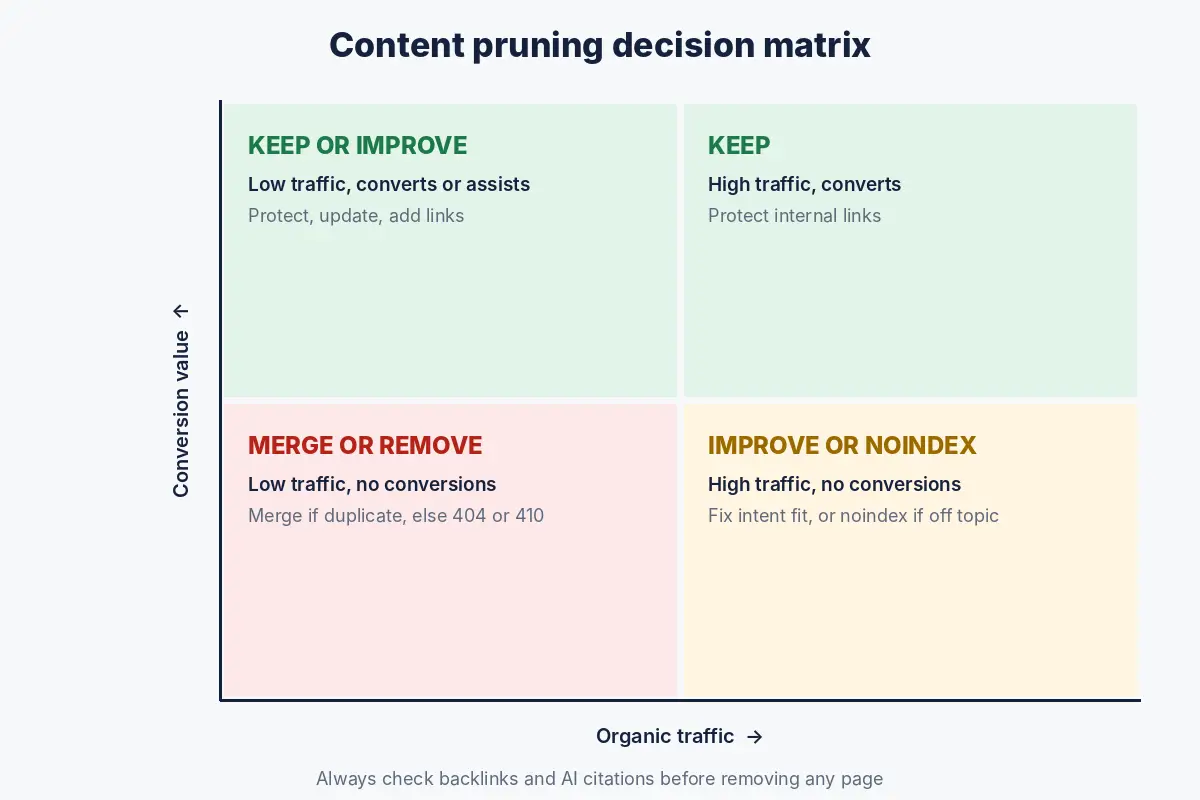
Five actions
| Action | When to use it | What to do |
|---|---|---|
| Keep | Converts or assists conversions, accurate and current | Leave it, protect its internal links |
| Improve | Targets a revenue keyword or assists conversions, but ranks or converts poorly | Update, deepen, fix the call to action, add internal links |
| Merge | Several weak pages cover the same topic | Combine into the strongest page and redirect the rest to it |
| Noindex | Useful to some visitors but not for search, or outside your expertise on sensitive topics | Keep live for users, add noindex, remove from the sitemap |
| Remove | No traffic, no conversions, no links, no purpose, and no close replacement | Delete and return 410 or 404; redirect only if a relevant page exists |
Decision rules you can adapt
Set thresholds from your own data. As a starting point for a mid sized site, these rules work well:
- Any page with a key event, revenue or a conversion path appearance in the last 12 months: keep or improve, never remove.
- Any page with 3 or more referring domains or an AI citation: keep, improve or merge with a redirect, never delete without a redirect.
- Pages that target a keyword in your revenue set: improve, whatever their current traffic.
- Two or more pages ranking for the same main query: merge.
- High traffic, zero conversions, off topic: noindex or remove, after checking for links.
- Under 10 clicks in 12 months, no conversions, no links, no strategic fit: remove.
- Sensitive health, finance or legal topics written without real expertise: noindex, rewrite with an expert or remove.
Illustrative example: pruning a beauty retailer’s blog
| Action | Pages | Typical examples |
|---|---|---|
| Keep | 240 | Skincare routine guides that assist orders |
| Improve | 310 | Ingredient guides linked to product categories, ranking 8 to 20 |
| Merge | 420 into 95 | Five separate “best sunscreen” posts from different years |
| Noindex | 60 | Event and giveaway posts kept for existing customers |
| Remove | 770 | Celebrity gossip, expired promotions, thin news posts |
Notice that the plan removes 770 pages, not 1,100, and that most of the work is improving and merging rather than deleting.
How to execute content pruning safely
Redirect only to relevant pages
Google’s documentation on redirects and Google Search recommends permanent server side redirects when you remove a page and want to send users to a new one, and explains that a permanent redirect signals that the target should be treated as canonical. Redirect merged pages to the page that replaces them. Do not redirect hundreds of unrelated pages to the home page; let pages with no relevant replacement return a 404 or 410.
A pruning checklist
- Back up every page you plan to change or remove.
- Work in batches of 50 to 200 pages, starting with merges.
- Move the best content from merged pages into the target page before redirecting.
- Update internal links so they point to the final URL, not through redirects.
- Remove deleted and noindexed URLs from the XML sitemap.
- Record the date of each batch in your analytics annotations or change log.
- Check Search Console for crawl errors and redirect issues after each batch.
Measuring the impact of content pruning
| Metric | What good looks like |
|---|---|
| Organic conversions and revenue | Stable or rising, even if sessions fall |
| Conversion rate of organic sessions | Rising, as irrelevant traffic falls away |
| Revenue keyword coverage | Rising, especially for merged and improved pages |
| Rankings of merged pages | The combined page ranks better than any of the originals |
| Crawl stats | More crawling of important pages, fewer errors |
Give it at least two to three months before judging, and compare with the same period last year to account for seasonality. Expect organic sessions to fall if you remove high traffic, off topic pages; that is the point, as long as conversions hold or rise.
Content pruning for different business types
Ecommerce
Discontinued product pages need special care. If a close replacement exists, redirect to it; if the product may return, keep the page with an “out of stock” notice and alternatives; if neither, let it return 404 or 410. Thin filtered category pages are usually better handled with canonical tags or noindex than deletion.
B2B software
Old feature announcements and outdated integration pages are common candidates. Merge announcements into a changelog, update integration pages or remove ones you no longer support, and never prune comparison or pricing pages based on traffic alone.
Healthcare and finance
Accuracy matters more than traffic. Pages with outdated medical or financial information should be reviewed by a qualified expert and updated, noindexed or removed, whatever their performance.
Common content pruning mistakes
- Deleting by traffic threshold alone. It removes pages that assist sales.
- Redirecting everything to the home page. Use relevant targets or let pages go.
- Deleting pages with backlinks without a redirect to a relevant page.
- Pruning everything at once. Batches let you see what works and reverse mistakes.
- Not fixing internal links after merges, leaving chains of redirects.
- Judging success by sessions. Judge by conversions and coverage.
For the technical checks that should run alongside a pruning project, see our SEO audit guide.
How Crawl To Click approaches content pruning
Crawl To Click is the SEO and AI visibility practice of Indu Priya, with more than 15 years of experience and more than 30 clients across the US, MENA and India, in healthcare, ecommerce, BFSI and fintech, beauty, fashion and lifestyle, and B2B software. Removing low value pages that bring traffic without business impact is a standard part of the “find what converts” stage of our method, and every decision is backed by analytics, user behaviour and conversion data rather than traffic thresholds.
In practice, we build a URL inventory that joins Search Console, analytics, conversion paths, backlinks, internal links and AI citation data, then review each cluster of pages against the client’s revenue keyword set. We favour merging and improving over deleting, plan redirects page by page, and roll changes out in batches so each one can be measured. Afterwards, Python scripts and dashboards track conversions, coverage and crawl behaviour so we can see what each batch changed, and quarterly content refreshes keep the remaining pages accurate. For ecommerce clients, the same process covers discontinued products and filtered category pages; for healthcare and finance clients, it includes expert review of every page that gives medical or financial information. Read more about us.
FAQs on content pruning
Does deleting old content improve SEO?
Not because it is old. Google has said that removing content just because of its age is not something its guidance encourages. Pruning helps when it removes or merges pages that are inaccurate, duplicate or serve no reader or business purpose.
How do I decide which pages to prune?
Join traffic, conversion, conversion path, backlink, internal link and AI citation data for every URL, then apply a decision matrix: keep, improve, merge, noindex or remove. Never remove a page that converts or assists conversions.
Should I redirect or delete pruned pages?
Redirect pages that have a relevant replacement, such as merged posts. Pages with no relevant replacement, no links and no traffic can return a 404 or 410. Avoid redirecting unrelated pages to the home page.
Will my traffic drop after content pruning?
It might, especially if you remove high traffic pages that are off topic. Judge success by conversions, conversion rate and revenue keyword coverage rather than sessions.
How often should I prune content?
Run a full review once a year and a lighter check each quarter alongside your content refreshes. Larger sites with frequent publishing may need a review every six months.
Need help pruning your content?
Hundreds of posts and no clear view of which ones earn their place? Request a content pruning audit and get a page by page plan based on conversion data, not guesswork.
Disclaimer: The beauty retailer and all example figures are imaginary and for illustration only. Thresholds are starting points; adjust them to your own data. Google guidance summarised here comes from the linked sources and may change.