The short answer: Claude Skills are folders containing a SKILL.md file of instructions, plus optional templates, reference files and scripts, that Claude loads automatically when a task matches the skill’s description. For SEO, they turn processes you repeat every week, such as content briefs, on page audits, schema generation and monthly reporting, into a standard Claude follows the same way every time. Skills work in Claude.ai on paid plans, in Claude Code and through the API. The best SEO skills are narrow, written as numbered steps with clear inputs and outputs, and tested against real examples before a team relies on them.
Prompts are fine for one off questions. Projects hold context for a brand or client. Skills hold method: the steps, checks and output formats that make SEO work consistent across people, clients and months. This guide explains how Skills work, which SEO workflows are worth packaging, how to write and test a SKILL.md, and how to install and share skills safely, with three complete examples you can adapt.
What are Claude Skills?
Claude Skills are packaged instructions that Claude discovers and loads when relevant: each skill is a folder with a SKILL.md file whose frontmatter gives a name and a description, followed by the instructions, with any extra files loaded only when needed.
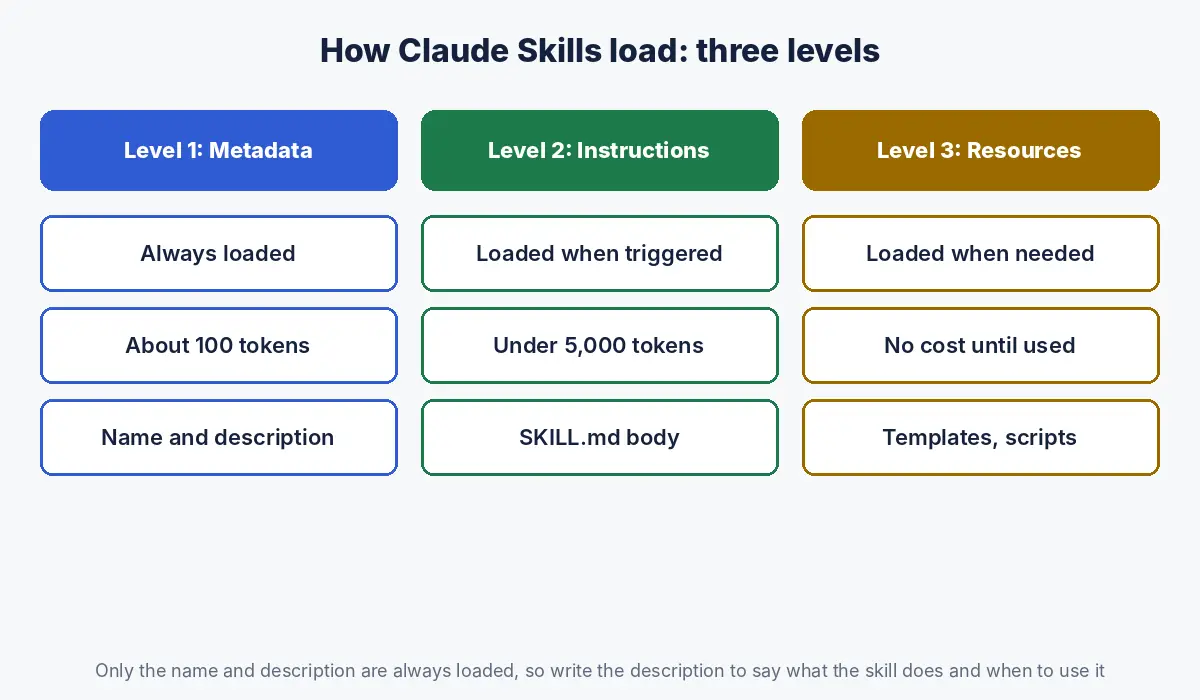
Anthropic describes Skills as organised folders of instructions, scripts and resources that agents can discover and load dynamically, and introduced them in October 2025 (Anthropic). The key design idea is progressive disclosure: Claude does not read every skill in full at the start of a conversation. It reads them in stages (Claude Platform documentation):
| Level | When Claude loads it | Approximate cost | What it contains |
|---|---|---|---|
| 1. Metadata | Always, at startup | About 100 tokens per skill | Name and description from the frontmatter |
| 2. Instructions | When the skill is triggered | Under 5,000 tokens | The body of SKILL.md |
| 3. Resources | Only when needed | None until used | Reference files, templates, scripts (only script output enters context) |
This is why you can install many skills without slowing Claude down, and why the description matters so much: it is the only part Claude sees when deciding whether to use the skill.
Why use Skills for SEO instead of prompts or Projects?
Use Skills when the same SEO process repeats across chats, clients or team members, because a skill carries the method with it, while a prompt must be pasted each time and a Project holds context for one brand rather than a reusable process.
| Saved prompt | Project | Skill | |
|---|---|---|---|
| Holds | One instruction | Brand or client context and files | A repeatable method with templates and scripts |
| Scope | Wherever you paste it | Chats inside that project | Every chat or session where it is installed |
| Loaded | Manually | Always, within the project | Automatically when the task matches, or by name |
| Can include scripts | No | No | Yes |
| Best SEO use | Quick one off tasks | Brand voice, client facts, keyword exports | Briefs, audits, schema, reports, refresh checks |
The strongest setup combines the two: a Project per client for context, as described in our hub on Claude for SEO, and shared Skills for method. A brief skill then produces a brief in your house format, using the client’s facts from the project (Claude Help Center).
Where can you use Claude Skills, and on which plans?
Claude Skills are available in Claude.ai on Pro, Max, Team and Enterprise plans with code execution enabled, in Claude Code from skill folders on your machine or in a repository, and through the Claude API with the code execution tool.
| Surface | How skills are added | Notes |
|---|---|---|
| Claude.ai (Pro, Max, Team, Enterprise) | Settings, Capabilities, Skills: upload a ZIP of the skill folder (Claude Help Center) | Requires code execution; uploaded skills are private to your account; Team and Enterprise owners can provision skills for everyone |
| Claude Code | Folders in ~/.claude/skills (personal) or .claude/skills in a project (Claude Code documentation) | Project skills can be committed so the whole team gets them; invoke with /skill name |
| Claude API | Skills attached to requests with the code execution tool (Claude Platform documentation) | For building your own SEO tools and pipelines |
Anthropic also provides built in skills for creating Word, Excel, PowerPoint and PDF files, which Claude uses automatically when relevant. They are useful for SEO deliverables such as audit spreadsheets and client reports. If you are new to the terminal side, start with our guide to Claude Code for SEO.
Which SEO workflows should become Skills?
The SEO workflows worth turning into Skills are those you repeat at least monthly, that follow a stable set of steps, and that produce a defined output, such as briefs, audits, schema, reports and content refresh checks.
| Skill | Trigger | Inputs | Output |
|---|---|---|---|
| Content brief | “Create a brief for [keyword]” | Keyword cluster, internal URL list | Brief in your template |
| On page audit | “Audit this page” | URL or page HTML, target keyword | Scored checklist with fixes |
| Schema generator | “Write schema for this page” | Page content, page type | JSON LD matching visible content |
| Monthly Search Console report | “Monthly SEO report” | Two period exports | Summary, tables, actions |
| Content refresh check | “Should we refresh this?” | URL, performance data | Refresh, merge, keep or prune decision |
| Title and meta rewrite | “Rewrite titles for these URLs” | CSV of URLs, keywords, current titles | CSV with new titles and lengths |
| Internal link suggestions | “Suggest internal links” | Draft, list of site URLs and topics | Anchor and target table |
| AI visibility check | “Run the prompt set” | Brand, competitors, question list | Mention and citation log |
Start with one. The brief skill usually pays back first, because briefs are frequent, their quality varies most between people, and a bad brief wastes the writing time that follows.
How do you write a SKILL.md for an SEO task?
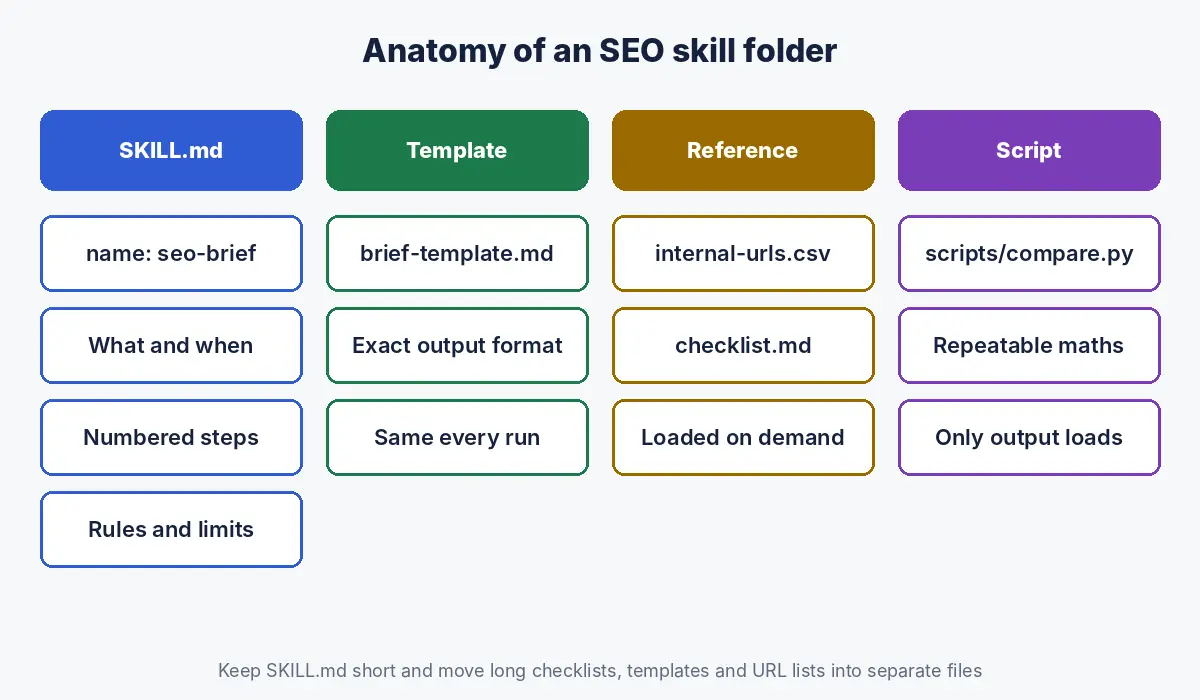
Write a SKILL.md with a short lowercase name, a description that says what the skill does and when to use it, then numbered steps with explicit inputs, checks and output format, and move long reference material into separate files that the steps point to.
The rules for the frontmatter, from Anthropic’s documentation (Claude Platform documentation):
- name: up to 64 characters, lowercase letters, numbers and hyphens only, no XML tags, and it cannot contain the reserved words “anthropic” or “claude”.
- description: up to 1,024 characters, and it must say both what the skill does and when Claude should use it. Put the key use case first.
- Body: keep SKILL.md under 500 lines and move detailed reference material into separate files (Claude Code documentation).
A complete content brief skill:
seo-brief/
  SKILL.md
  brief-template.md
  internal-urls.csv

--- SKILL.md ---
---
name: seo-brief
description: Create an SEO content brief from a keyword or keyword
  cluster. Use when asked for a brief, outline or content plan for
  a blog post, guide or landing page.
---
# SEO content brief

## Inputs
- Primary keyword (required). Secondary keywords (optional).
- Brand context from the current project, if any.

## Steps
1. State the search intent in one sentence. If intent is mixed,
   say so and recommend one page type.
2. Search the web for the current top results. List the questions
   they answer and the questions none of them answer well.
3. Write 6 to 10 H2s as questions a buyer would ask. Each H2 gets
   a one sentence answer to open the section.
4. Choose up to 5 internal links from internal-urls.csv. Use
   descriptive anchor text. Never invent URLs.
5. List statistics worth citing, each with a source link.
   If no source is found, write [NO SOURCE] instead of a number.
6. Fill brief-template.md and return it.

## Rules
- British English. No filler introductions.
- Do not recommend a page if internal-urls.csv already has one
  for the same intent; recommend updating it instead.
The brief template itself can follow the structure in our content brief template. Note how the skill handles the two biggest risks in AI briefs: invented statistics (step 5) and duplicate pages (the last rule).
Example: an on page audit skill with a reference checklist
An on page audit skill works best when the checklist lives in a separate reference file and the skill tells Claude to score each item, quote the evidence from the page, and give a specific fix.
---
name: onpage-audit
description: Audit a single web page for on page SEO and AI
  answer readiness. Use when asked to audit, review or score a
  page or URL.
---
1. Fetch the page or read the HTML provided.
2. Work through every item in checklist.md. For each, record:
   pass, fail or not applicable; the evidence quoted from the
   page; and a specific fix.
3. Check that every H2 opens with a direct answer.
4. Check that structured data matches visible content.
5. Return a table sorted by impact, then a three line summary.
The checklist.md file can hold your full on page standard, for example the relevant parts of our SEO checklist. Because it is a level 3 resource, it costs nothing until the skill runs.
Example: a monthly Search Console report skill with a script
A reporting skill can bundle a Python script that does the calculations, so the numbers are computed the same way every month and only the script’s output enters Claude’s context.
---
name: gsc-monthly-report
description: Build the monthly organic search report from two
  Search Console exports. Use when asked for a monthly SEO report
  or a period comparison of Search Console data.
---
1. Confirm two files: current and previous period, page level.
2. Run scripts/compare.py on both files. It outputs totals,
   top 20 click gainers and losers, and a CTR versus position
   label for each page.
3. Check the script's row counts. If totals do not match the
   files, stop and report the mismatch.
4. Write: three headline numbers, the five biggest changes with
   likely causes, and three recommended actions.
5. Keep commentary factual; mark causes as likely, not certain.
The analysis logic behind a script like this is set out in our guide to analysing Search Console data with Claude.
How do you test and improve an SEO skill?
Test an SEO skill on five to ten real tasks with known good answers, check whether Claude triggers it when it should and ignores it when it should not, compare outputs against your standard, and tighten the steps where results vary.
| Test | What to check | Typical fix |
|---|---|---|
| Triggering | Does it load for “write a brief for X” but not for “write the article”? | Make the description more specific about when to use it |
| Inputs | Does it ask for missing inputs rather than guessing? | Add a step: if X is missing, stop and ask |
| Consistency | Do three runs on the same keyword produce comparable briefs? | Replace vague steps with explicit criteria and counts |
| Accuracy | Are sources real and URLs from your list? | Add rules against inventing figures and URLs |
| Output | Does it follow the template exactly? | Put the template in a file and reference it |
Keep a changelog at the bottom of SKILL.md. When someone on the team improves a step, everyone benefits on the next run, which is the real advantage of skills over personal prompt libraries.
How do you install and share Skills across an SEO team?
In Claude.ai, upload each skill as a ZIP in Settings under Capabilities; on Team and Enterprise plans, owners can provision skills for the whole organisation; in Claude Code, commit skills to the project’s .claude/skills folder so everyone working on the repository has them.
- Create the skill folder with SKILL.md at its root and supporting files beside it.
- Check the folder name matches the skill name; mismatches, a missing SKILL.md and invalid characters are common upload failures (Claude Help Center).
- ZIP the folder and upload it, or place it in the Claude Code skills directory.
- Run your test tasks before announcing it to the team.
- For teams, keep the master copy in a shared repository and version it, so changes are reviewed like any other process document.
Uploaded skills in Claude.ai are private to your account, and individual peer to peer sharing is not currently available; organisation wide provisioning is done by owners (Claude Help Center).
Are Claude Skills safe to use with client data?
Skills you write yourself or obtain from Anthropic are low risk; skills from unknown sources should be treated like installing software, because a malicious skill can instruct Claude to run code or send data in ways that do not match its stated purpose.
- Anthropic recommends using skills only from trusted sources and auditing every bundled file, especially scripts and any instructions that fetch external content (Claude Platform documentation).
- Never put API keys, passwords or client credentials in a skill.
- Keep client specific facts in the client’s Project, not in a shared skill, so one client’s information never appears in another’s work.
- Review scripts in skills you download from public collections before uploading them.
What are the common mistakes when building SEO skills?
| Mistake | Fix |
|---|---|
| One giant skill for “all SEO” | Narrow skills, one per workflow |
| Vague description such as “helps with SEO” | Say what it does and when to use it, key use case first |
| Steps like “make it good” | Explicit criteria, counts and output formats |
| Long reference text inside SKILL.md | Move it to separate files the steps point to |
| No rule against invented statistics or URLs | Require sources and approved URL lists |
| Using “claude” in the skill name | Reserved word; choose another name |
| Never testing after edits | Rerun the test set after every change |
How Crawl To Click builds Skills for SEO teams
Crawl To Click is an SEO and AI visibility consultancy, and we turn the processes behind our own work, including briefs, page audits, schema, reporting and AI visibility checks, into skills with clear inputs, steps and outputs. For agency and in house teams, we document their existing process first, decide which parts are stable enough to package, write and test the skills against real past work, and pair them with project setups that hold each client’s context. We have built this kind of workflow for teams serving software, healthcare, education, property, ecommerce and professional services clients.
FAQs on Claude Skills for SEO
What are Claude Skills?
Claude Skills are folders containing a SKILL.md file of instructions, with optional templates, reference files and scripts, that Claude loads automatically when a task matches the skill’s description, so a repeatable process is followed the same way every time.
How are Skills different from Claude Projects?
Projects hold context, such as a brand’s guidelines, facts and files, for chats inside that project. Skills hold a reusable method, such as how to write a brief or run an audit, and can be used across chats and projects wherever they are installed.
Which Claude plans include Skills?
Skills are available in Claude.ai on Pro, Max, Team and Enterprise plans with code execution enabled. They are also available in Claude Code and through the Claude API with the code execution tool.
What SEO tasks are best for Skills?
The best SEO tasks for Skills repeat often and follow stable steps with a defined output: content briefs, on page audits, schema generation, monthly Search Console reports, title and meta rewrites, internal link suggestions and content refresh decisions.
Can I share a Claude Skill with my SEO team?
On Team and Enterprise plans, owners can provision skills for the whole organisation. In Claude Code, skills saved in a project’s .claude/skills folder and committed to the repository are available to everyone working on it.
Is it safe to download SEO skills from the internet?
Only with care. Anthropic advises using skills from trusted sources and auditing all bundled files, because a malicious skill could run code or send data in ways that do not match its description. Treat it like installing software.
Want SEO skills built around your team’s process?
Agencies and in house teams get the most from skills that encode how they already work. Let’s talk about building them for your team.
Disclaimer: This article reflects Anthropic documentation as of the dates stated. Skills, plan availability and limits change over time; check Anthropic’s current documentation. Example skills are starting points to adapt and test.