Most SEO reports are 20 slides of charts that nobody reads past page two. The founder wants to know if SEO is bringing in money, the marketing head wants to know what to tell the board, and the SEO team wants to know what to fix next. A good report answers all three on one page, then backs it up with the data.
The short answer: a useful SEO report template has a one page summary of 8 to 10 metrics compared with last month and with targets, supporting tabs for organic traffic and conversions, Search Console data, revenue keyword rankings and AI search visibility, a log of work done and planned, and three to five lines of commentary explaining what changed and why. Download our free template below; it calculates the summary automatically from the data you paste in.
Download the free SEO report template (XLSX, works in Google Sheets and Excel)
What is in the free SEO report template
| Tab | What it tracks | Where the data comes from |
|---|---|---|
| Summary | 10 key metrics: this month, last month, change, target and status | Calculated automatically from the other tabs |
| Traffic | Organic and AI assistant sessions, key events, revenue and conversion rates by month | Google Analytics 4 |
| Search Console | Clicks, impressions, CTR, average position and non branded clicks | Search Console Performance report |
| Revenue keywords | Positions for up to 100 revenue keywords, top 3 coverage and weighted coverage | Your rank tracker |
| AI visibility | Answers collected, brand mentions and citations per platform, per 100 answers | Your AI visibility tool or a manual prompt log |
| Top pages | Landing pages by sessions, key events, revenue and conversion rate | Google Analytics 4 |
| Work log | Work completed, pages affected, expected impact, status and owner | Your team |
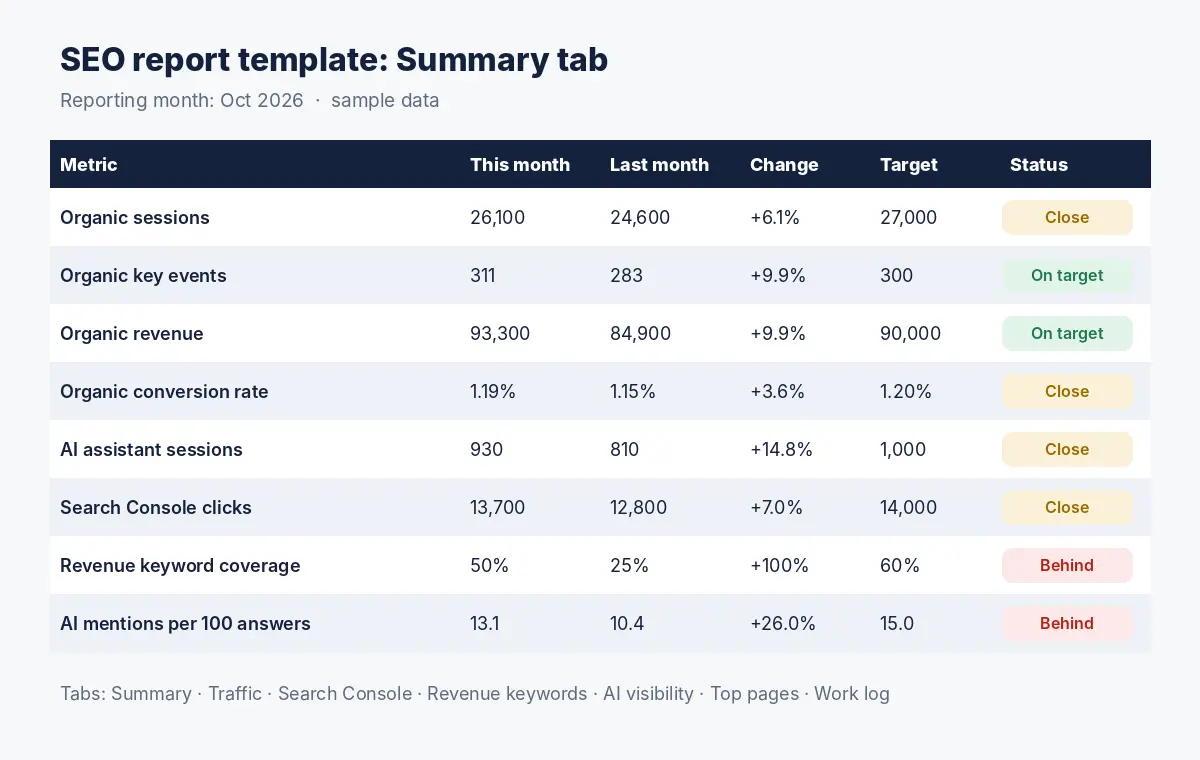
Yellow cells are inputs; everything else calculates. The status column marks each metric as on target, close (within 10% of target) or behind, so the reader can see the month at a glance.
What to include in an SEO report
Metrics that connect to the business
- Organic key events and revenue: sign ups, leads, bookings or sales from organic search. This is the headline.
- Organic conversion rate: shows whether traffic quality is improving or slipping.
- Revenue keyword coverage: the share of your most valuable keywords in the top 3, as explained in our guide to search coverage.
- AI assistant sessions and mentions: visits referred by ChatGPT, Gemini, Perplexity and Copilot, and how often AI answers mention your brand.
Supporting metrics
- Search Console clicks and impressions: overall search visibility, split into branded and non branded.
- Top landing pages: which pages drive results, and which have traffic without conversions.
- Technical health: indexing issues and Core Web Vitals, reported only when something changed.
What to leave out
- Domain authority scores and keyword counts with no link to revenue.
- Every chart your tools can produce. If a number does not lead to a decision, cut it.
- Average position across all keywords, which hides what matters; report revenue keywords instead.
How to fill in the SEO report template
Step 1: export organic and AI traffic from GA4
In Google Analytics 4, open the traffic acquisition report, filter to organic search for the month, and note sessions, key events and revenue. For AI assistants, filter by session source for chatgpt.com, gemini.google.com, perplexity.ai and copilot.microsoft.com, or create a custom channel group so AI traffic appears as its own row. Enter the totals in the Traffic tab.
Step 2: export Search Console data
In the Search Console Performance report, set the date range to the month and note total clicks, impressions and average position. For non branded clicks, add a query filter, choose Custom (regex), select “Doesn’t match regex” and enter your brand terms:
yourbrand|your brand|yourbrndReplace the examples with your brand name and common misspellings, separated by a vertical bar. Search Console uses RE2 regex syntax, which does not support lookaheads, so the exclusion is done with the filter option rather than in the pattern.
Step 3: update revenue keyword positions
List your revenue keywords, their target URLs and monthly values in the Revenue keywords tab, then enter last month and this month positions from your rank tracker. Coverage and weighted coverage calculate automatically. Our guide to building a revenue keyword set shows how to choose the keywords and estimate their value.
Step 4: log AI visibility
Enter the number of AI answers collected and how many mentioned or cited your brand, by platform. The template calculates mentions per 100 answers. Because AI answers vary between runs, collect enough answers each month for a stable number; our guide to measuring LLM mentions per 100 queries explains the sampling.
Step 5: set targets and write the commentary
Enter monthly targets on the Summary tab, then write three to five lines of commentary. This is the part leaders read, so make it specific.
Organic revenue rose 10% to 93,300 as two category pages reached
the top 3 for their main keywords. AI assistant sessions grew 15%,
led by Perplexity citing our comparison page. Coverage of revenue
keywords is 50% against a 60% target. Next month we publish the
comparison page for keyword five and fix internal links to it.
SEO reporting for different audiences
| Reader | What they need | Use these tabs |
|---|---|---|
| Founder or chief executive | Is SEO making money, and is it improving? | Summary and commentary only |
| Marketing head | Progress against targets, risks and what to prioritise | Summary, Revenue keywords, AI visibility, Work log |
| SEO and content team | What to fix and build next | All tabs, especially Top pages and Revenue keywords |
| Client of an agency | Value for the fee and what was delivered | Summary, Work log and commentary |
How often to report on SEO
- Monthly: the full report. SEO changes slowly, and weekly reports mostly show noise.
- Weekly: a short check of key events and any sudden drops, shared only when something needs action.
- Quarterly: a review of targets, the revenue keyword set and the plan, with a comparison against the same quarter last year to account for seasonality. Our guide to SEO forecasting covers how to set targets finance will accept.
Common SEO reporting mistakes
- Reporting traffic without conversions. Rising sessions with flat key events is a warning, not a win.
- Mixing branded and non branded results. Brand searches grow with advertising and PR, not mainly with SEO.
- Ignoring AI search. AI assistants now send visits and shape buying decisions; leaving them out understates SEO’s reach.
- No commentary. Numbers without explanation lead to the wrong conclusions.
- Changing metrics every month. Keep the same summary so trends are comparable. See our guide to AEO and SEO KPIs for what belongs on it.
How Crawl To Click reports on SEO
At Crawl To Click, reporting starts from the client’s revenue, not from rankings. We agree the key events and revenue keywords that define success at the start of an engagement, then build a custom reporting dashboard that joins analytics, Search Console, rank tracking and AI visibility data. Each month, the summary shows progress against targets, and the commentary explains what changed and what we will do next. Behind the scenes, automated checks in Python and Power BI or Looker Studio flag sudden drops so issues are caught between reports, and the plan is adjusted after each core update rather than waiting for the quarterly review. Learn more about our approach.
Download the free SEO report template (XLSX, works in Google Sheets and Excel)
FAQs on SEO report templates
What should an SEO report include?
A summary of key metrics compared with last month and targets, organic traffic and conversions, Search Console clicks and impressions, revenue keyword rankings, AI search visibility, a log of work done and planned, and short commentary explaining the changes.
How often should SEO be reported?
Monthly for the full report, with quick weekly checks for sudden drops and a quarterly review of targets and plans.
Can I use this SEO report template in Google Sheets?
Yes. In Google Sheets, choose File, Import, upload the file and replace the spreadsheet. The formulas work in Google Sheets and Excel.
How do I report AI search in an SEO report?
Track sessions and key events from AI assistants in analytics, and log how often AI answers mention or cite your brand across a fixed set of prompts. The template’s AI visibility tab calculates mentions per 100 answers.
What is the most important SEO metric to report?
Organic key events or revenue, because they show business impact. Revenue keyword coverage is the best leading indicator, since it usually moves before revenue does.
Need an independent view of your SEO reporting?
Getting reports full of charts but no clear answer on whether SEO is working? Request an audit and we will show you what your data actually says.
Disclaimer: The figures in the template and screenshots are sample data for illustration. Replace them with your own. Report menus in Google Analytics and Search Console may change over time.