The short answer: the best Claude prompts for SEO follow Anthropic’s own guidance: put long inputs such as exports, pages or briefs at the top, wrap each input in clearly named XML tags, give the task and the exact output format at the end, explain why each rule matters, and ask Claude to quote the relevant parts of a document before it analyses it. This article gives 20 copy ready prompts in that format, grouped by SEO task: keyword research, content briefs, writing and editing, on page optimisation, technical SEO, Search Console analysis and AI visibility.
Generic prompts work in any assistant; our 100 prompts for SEO by task are written that way. The prompts here are built specifically for how Claude reads instructions, which matters most when you give it large inputs such as a 1,000 row export, a competitor’s full page or a client’s style guide. Replace the bracketed placeholders, paste your data between the tags, and adjust the rules to your standards.
What makes a Claude prompt different from a generic SEO prompt?
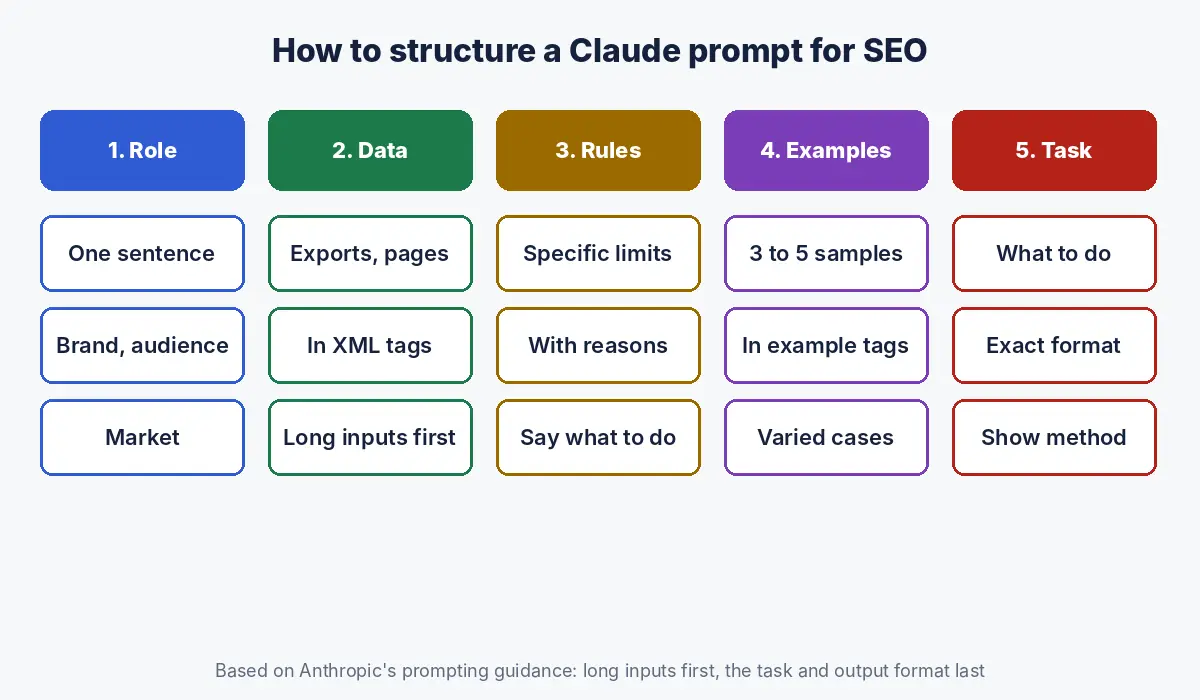
A Claude prompt for SEO separates instructions, data and examples with XML tags, places long data before the question, states the output format precisely, and explains the reason behind important rules, all of which Anthropic recommends in its prompting guidance.
| Technique | What Anthropic recommends | Why it matters for SEO |
|---|---|---|
| Long inputs first | Place long documents near the top, above the query; queries at the end can improve response quality by up to 30% in tests (Anthropic) | Exports, crawls and competitor pages are long |
| XML tags | Tags help Claude parse prompts that mix instructions, context, examples and inputs; use consistent, descriptive names (Anthropic) | Keeps your keyword list separate from your rules |
| Quote first | For long documents, ask Claude to quote the relevant parts before doing the task (Anthropic) | Grounds analysis in the actual page or export |
| Examples | Three to five relevant, varied examples, wrapped in example tags (Anthropic) | Teaches your title style or brief format |
| Explain why | Give the reason behind a rule so Claude can generalise from it (Anthropic) | “Under 60 characters so titles are not cut off” beats “short titles” |
| Say what to do | Tell Claude what to do instead of what not to do (Anthropic) | “Write in short, plain sentences” beats “no fluff” |
| Role | A single sentence of role setting focuses behaviour and tone (Anthropic) | Sets the expertise level and audience |
Anthropic’s simplest test applies to SEO prompts too: think of Claude as a brilliant but new employee who lacks context on your norms, and if a colleague with no background would be confused by your prompt, Claude will be too (Anthropic).
What is the basic template for a Claude SEO prompt?
The basic template is a role sentence, the data in tagged blocks, the rules with reasons, optional examples, and the task with the output format last; every prompt below follows it.
You are a senior SEO specialist working for [brand], which
serves [audience] in [market].

<data>
[paste export, page text, keyword list or brief here]
</data>

<rules>
- [Rule], because [reason].
- If information is missing, write [CHECK] instead of guessing,
  because this output will be published under our name.
</rules>

<examples>
<example>[one example of the output you want]</example>
</examples>

Task: [what to do with the data].
Output: [exact format: table columns, word counts, file type].
If you use these prompts often, move the role and rules into a Claude Project so you only paste the data and the task; see our guide to Claude Projects for SEO teams.
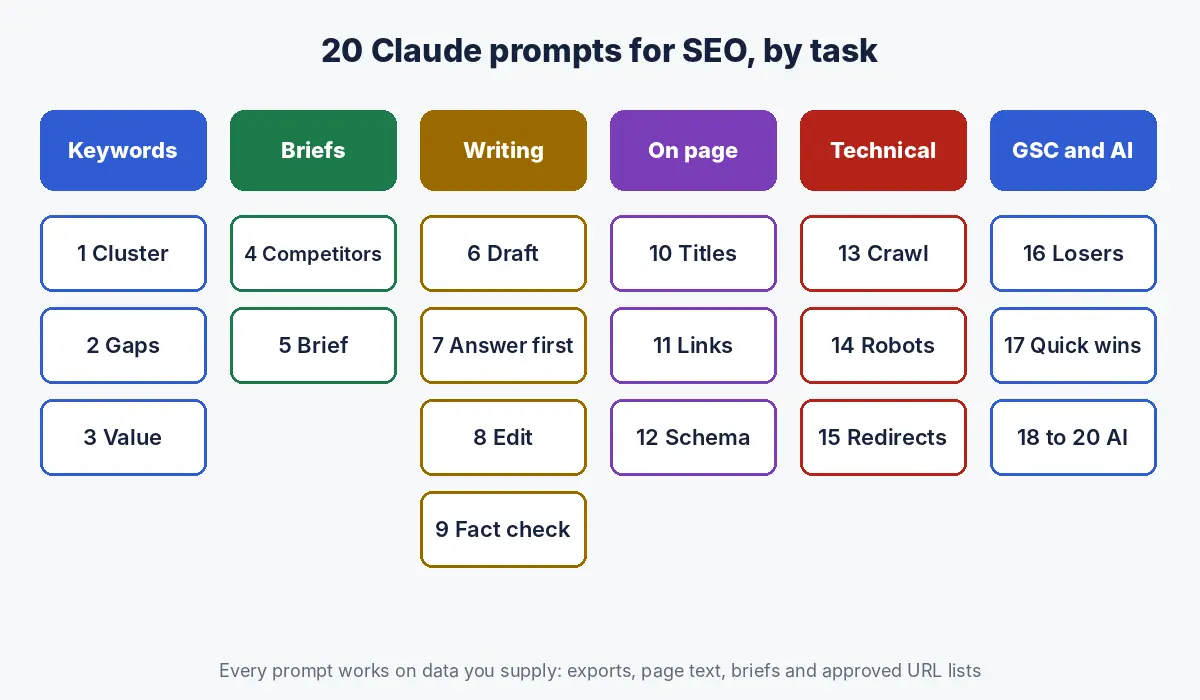
Which Claude prompts work for keyword research and clustering?
Use Claude to cluster, label and prioritise keywords you have exported from an SEO tool or Search Console, never to invent search volumes, which Claude does not have.
1. Cluster keywords by search intent
<keywords>
[paste export: keyword, volume, difficulty, current ranking URL]
</keywords>

<rules>
- Group keywords that one page could satisfy, because separate
  pages for the same intent compete with each other.
- Use only the volumes in the data. Never estimate a number.
</rules>

Task: cluster the keywords. For each cluster give a label, the
primary keyword (highest volume), intent (informational,
commercial, transactional, navigational), total volume, and the
existing URL if one already ranks.
Output: a table sorted by total volume.
Why it works: the rule explains why clusters matter, so Claude groups by what a single page can satisfy rather than by shared words. Check a sample against live results: if Google shows different pages for two keywords, split them.
2. Find keyword gaps against your existing pages
<our_urls>[paste URL, title, primary keyword for every page]</our_urls>
<keywords>[paste clustered keyword table]</keywords>

Task: for each cluster, say whether an existing URL covers it
(quote the matching title), partly covers it, or not at all.
Output: three lists: covered, partly covered (with what is
missing), and gaps (with a suggested page type).
Why it works: asking Claude to quote the matching title forces it to show evidence for every “covered” decision, which makes wrong matches easy to spot.
3. Label commercial value
<keywords>[paste cluster table]</keywords>
<business>[what we sell, to whom, average deal size]</business>

Task: rate each cluster high, medium or low for likelihood of
leading to an enquiry, with a one line reason, because we
prioritise pages that generate revenue over traffic.
Output: the table with two new columns: value, reason.
Why it works: the business block gives Claude what it cannot know, namely what you sell and what a lead is worth, so the ratings reflect revenue rather than traffic.
Which Claude prompts work for content briefs and outlines?
Brief prompts work best when Claude reads the actual top ranking pages first and quotes what they cover, then builds a brief that answers what they miss.
4. Competitor coverage analysis
<documents>
<document index="1"><source>[URL 1]</source>
<document_content>[page text]</document_content></document>
<document index="2"><source>[URL 2]</source>
<document_content>[page text]</document_content></document>
</documents>

First, quote the H2 and H3 headings from each document in
<quotes> tags. Then list: questions all documents answer,
questions only one answers, and reader questions none answer well.
Output: three bullet lists, each item with its source number.
Why it works: this is Anthropic’s quote first technique. Claude extracts the headings before comparing, which keeps the analysis tied to what the pages actually say.
5. Write a content brief
<keyword>[primary keyword]</keyword>
<coverage>[paste output from prompt 4]</coverage>
<internal_links>[paste approved URL list]</internal_links>

<rules>
- Every H2 is a question a buyer would ask, because AI answers
  and featured snippets lift question and answer passages.
- Internal links only from the approved list.
- Mark any statistic without a source as [NO SOURCE].
</rules>

Task: write a brief with search intent, target reader, title
options (under 60 characters), meta description (140 to 160
characters), H2 and H3 outline with a one line answer under each
H2, entities to mention, internal links with anchors, and sources.
Why it works: the brief uses the output of prompt 4 rather than Claude’s memory of the topic, and the rules prevent invented links and statistics, the two most common brief errors.
For the brief structure itself, see our guide to Claude Skills for SEO, which turns this prompt into a reusable skill.
Which Claude prompts work for writing and editing SEO content?
Use Claude to draft and edit against a brief, and keep people responsible for experience, examples and fact checking; Google’s guidance asks publishers to review and fact check AI generated content before publishing (Google Search Central).
6. Draft one section from a brief
<brief>[paste the brief]</brief>
<voice>[paste voice guide or two approved paragraphs]</voice>

Task: write only the section for the H2 "[H2 question]".
Open with a one or two sentence answer that names the subject
and states the key fact, so the passage makes sense if quoted
alone. Then add detail in short paragraphs, using a table if
you compare options. 200 to 300 words.
Mark any claim that needs a source with [SOURCE?].
Why it works: drafting one section at a time keeps quality high and makes review manageable. The instruction that the opening must make sense alone produces passages AI answers can quote.
7. Rewrite a section into answer first format
<section>[paste existing section]</section>

Task: rewrite so the first sentence directly answers the
heading's question with the key fact, number or condition.
Keep every fact; do not add new ones. Then list what you moved
or cut and why.
Why it works: the constraint to keep every fact and add none stops the rewrite from introducing errors, and the change list makes review fast.
8. Edit for clarity and house style
<draft>[paste draft]</draft>
<style>[paste style rules]</style>

Task: edit for clarity and the style rules. Write in short,
plain sentences. Return the edited text, then a table of the ten
most important changes: original, edit, rule applied.
Why it works: the change table shows which rule caused each edit, so you can see whether your style rules are being applied the way you intended.
9. Fact check a draft
<draft>[paste draft]</draft>

Task: quote every factual claim, statistic, date and price in
<claims> tags. For each, say whether the draft gives a source,
and rate it: verifiable, needs source, or likely outdated.
Do not judge whether claims are true from memory; flag them
for a person to check.
Why it works: Claude is asked to flag claims rather than judge them from memory, so the output is a checklist for a person, not a false sense of verification.
Which Claude prompts work for on page optimisation?
On page prompts work best in bulk from a CSV, with examples of your preferred style and the reasons behind length and placement rules, so Claude produces titles, links and schema you can review and import.
10. Title tags and meta descriptions in bulk
<pages>[paste CSV: URL, primary keyword, current title, H1]</pages>

<examples>
<example>Keyword: seo audit dubai
Title: SEO Audit in Dubai: What You Should Receive</example>
<example>Keyword: aeo pricing uae
Title: AEO Pricing in the UAE: Retainer vs Project Costs</example>
</examples>

<rules>
- Titles under 60 characters so they are not cut off in results.
- Primary keyword near the start. No brand name unless it fits.
- Meta descriptions 140 to 160 characters with a reason to click.
</rules>
Output: CSV with URL, new title, length, new meta, length.
Why it works: two examples teach your title pattern better than any description of it, and the stated reasons let Claude handle awkward keywords sensibly.
11. Internal link suggestions
<article>[paste draft]</article>
<site_urls>[paste URL, title, primary keyword]</site_urls>

Task: suggest up to 7 internal links. For each: the exact phrase
in the article to link (quote it), the target URL, and why the
target helps the reader. Never link to URLs not in the list.
Why it works: quoting the exact phrase to link makes suggestions easy to apply, and the closed URL list prevents links to pages that do not exist.
12. Schema markup from page content
<page>[paste visible page text]</page>

Task: write JSON-LD for [Organization / Product / FAQPage /
Article]. Use only facts visible in the page text, because
structured data must match what users can see. List any property
you left out because the page does not support it.
Why it works: limiting Claude to visible facts keeps the markup compliant, and the list of omitted properties shows what the page would need to support richer markup.
Google requires structured data to be a true representation of the page and not to mark up content invisible to readers (Google Search Central). For type by type templates, see our schema markup examples.
Which Claude prompts work for technical SEO?
Technical prompts should make Claude confirm it has read the data correctly first, then report issues with counts, examples and fixes, and show the method so results can be checked and rerun.
13. Crawl export triage
<crawl>[paste or attach crawl export]</crawl>

Task: first report the columns and row count. Then list issues
by impact: redirect chains, links to non 200 URLs, canonicals to
non indexable pages, duplicate titles, missing H1, indexable
pages with under 2 inlinks. For each: count, 5 example URLs,
recommended fix. Show the code or formulas you used.
Why it works: reporting columns and row count first confirms Claude read the file correctly before any finding is trusted.
14. Robots.txt review
<robots>[paste robots.txt]</robots>
<important_paths>[list paths that must be crawlable]</important_paths>

Task: list every user agent group and what it blocks. Flag any
rule that blocks an important path, and any AI search crawler
(OAI-SearchBot, PerplexityBot, Claude-SearchBot) that is blocked.
Explain each finding in one sentence.
Why it works: listing important paths gives Claude a test to run rather than a general opinion to offer, and checking AI search crawlers catches blocks set by default security tools.
15. Redirect map for a migration
<old_urls>[old URL, title, clicks]</old_urls>
<new_urls>[new URL, title, H1]</new_urls>

Task: match each old URL to the most relevant new URL. Score
confidence high, medium or low with a reason. List unmatched old
URLs separately, sorted by clicks, because high traffic pages
need a person to choose their target.
Output: CSV: old URL, new URL, confidence, reason.
Why it works: confidence scores and a separate list of high traffic unmatched URLs focus human review where mistakes cost most.
Which Claude prompts work for Search Console analysis?
Search Console prompts should compare two equal periods, report row counts after joining files, and separate ranking, demand and click through rate causes, so each finding leads to a specific fix.
16. Click losers and their cause
<period_a>[pages export, previous period]</period_a>
<period_b>[pages export, current period]</period_b>

Task: join on URL and report row counts after the join. List the
20 pages with the largest click loss with clicks, impressions,
CTR and position for both periods. Label each loss RANKING,
DEMAND or CTR, and explain the label in one line.
Why it works: the three labels separate lost rankings, lower demand and lost click through rate, which need completely different fixes.
17. Quick wins in positions 8 to 20
<queries>[query and page export, current period]</queries>

Task: list queries with average position 8 to 20 and at least
200 impressions, grouped by page, with the five largest per page.
Mark queries with commercial intent. Sort pages by impressions
of commercial queries.
Why it works: grouping by page turns a long query list into a short list of pages to improve, and the commercial flag puts revenue first.
Our guide to analysing Search Console data with Claude explains how to export the data and check the results.
Which Claude prompts work for AI visibility?
AI visibility prompts help you build a fixed set of buyer questions, log what assistants say about you and competitors, and check whether your pages open each section with a quotable answer.
18. Build an AI visibility prompt set
<business>[what we sell, to whom, where, main competitors]</business>

Task: write 30 questions real buyers would ask an AI assistant
before choosing a provider like us: 8 category, 6 problem,
6 comparison, 5 cost and 5 brand questions. Use natural buyer
wording, including location where relevant.
Output: a numbered list grouped by type.
Why it works: a fixed mix of question types covers how buyers actually ask, from category shortlists to brand checks, so the set measures visibility across the whole journey.
19. Analyse AI answers you collected
<answers>[paste answers from ChatGPT, Gemini, Perplexity,
each labelled with assistant, question and date]</answers>
<brand>[our brand and competitors]</brand>

Task: for each answer, record which brands are mentioned, in what
order, which sources are cited, and any factual error about us
(quote it). Then summarise mention rate per brand per assistant.
Why it works: recording order, sources and quoted errors turns a pile of screenshots into data you can compare month to month.
20. Check a page for answer readiness
<page>[paste page text]</page>

Task: for each H2, quote its first sentence and say whether it
answers the heading directly with a specific fact. List missing
facts a buyer would expect (price, location, timeline, who it is
for). Suggest a rewritten first sentence for each weak section.
Why it works: quoting each first sentence makes weak openings obvious, and the missing facts list shows what buyers and AI answers expect the page to state.
How do you adapt Claude SEO prompts for UAE and Arabic content?
Adapt prompts for the UAE by stating the market, language and regulator in the role sentence, supplying Arabic keyword data separately rather than translating English keywords, and asking Claude to keep English and Arabic facts identical.
- Name the market. “Serving businesses in Dubai and Abu Dhabi” changes examples, currency (AED) and spelling conventions.
- Research Arabic keywords separately. Arabic searchers often use different terms, dialect words or transliterations; translating an English list misses them. Export Arabic keyword data and cluster it in its own prompt.
- Pair language versions. When drafting Arabic pages, paste the approved English facts in a facts tag and ask Claude to use only those, so prices and services match across languages.
- Add regulatory rules. For healthcare, finance, property and education, paste the relevant advertising rules into a rules tag with the reason, for example that claims will be reviewed by a regulator.
- Ask for a native review flag. Have Claude mark phrases that need a native speaker’s check, because tone and formality expectations differ across Gulf audiences.
What are the common mistakes when prompting Claude for SEO?
| Mistake | Better approach |
|---|---|
| Asking for search volumes or rankings from memory | Paste the export and ask Claude to work only from it |
| Instructions after a long paste are lost in vague wording | Data first in tags, task and format last |
| “Make it SEO friendly” | Name the exact rules: length, keyword position, headings |
| Rules without reasons | Add the reason so Claude applies it sensibly to edge cases |
| Accepting analysis without the method | Ask for row counts and the code or formulas |
| Publishing drafts without review | Fact check every claim; add first hand experience |
How Crawl To Click uses Claude prompts in SEO work
Crawl To Click is an SEO and AI visibility consultancy, and we use structured prompts like these as the building blocks of repeatable workflows. Data always comes from tools and exports, never from model memory; every prompt asks for its method or sources; and the prompts we use most become skills and project instructions so the whole team gets the same quality. We apply this across software, healthcare, education, property, ecommerce and professional services work. For the bigger picture, see our hub on Claude for SEO.
FAQs on Claude prompts for SEO
What is the best prompt structure for Claude in SEO tasks?
Put a one sentence role first, then long inputs such as exports or page text inside clearly named XML tags, then rules with reasons, optional examples, and finally the task and exact output format. Anthropic reports that placing queries after long documents can improve response quality by up to 30% in tests.
Why use XML tags in Claude prompts?
XML tags separate instructions, data, examples and inputs so Claude can tell them apart, which reduces mistakes when a prompt contains a long keyword list, a crawl export or several competitor pages.
Can Claude give me search volumes for keywords?
No. Claude does not have a keyword database, so any volumes it gives from memory are unreliable. Export keywords with volumes from an SEO tool or Search Console and ask Claude to cluster and prioritise them using only that data.
Do ChatGPT SEO prompts work in Claude?
Yes, most do, but Claude performs better with prompts structured the way Anthropic recommends: long data first in XML tags, the task at the end, explicit output formats and reasons behind rules.
How do I stop Claude inventing statistics in SEO content?
Tell Claude to mark any claim without a source as needing one rather than supplying a number, ask it to quote its sources, and have a person check every figure before publishing, as Google’s guidance on AI generated content requires.
Should I save Claude prompts as Skills?
Prompts you run weekly with the same standard are good candidates for Skills, which package the instructions, templates and scripts so Claude follows the same method every time without the prompt being pasted again.
Want prompts built around your SEO process?
Generic prompts get generic results. Let’s talk about turning your team’s process into prompts, Projects and Skills.
Disclaimer: This article reflects Anthropic and Google documentation as of the dates stated. Prompts are starting points to adapt and test; review all AI output before publishing.